
Kling 3.0: The 'All-in-One' AI Video Generator Claims the Crown – But Does It Truly Deliver?
According to the official announcement from Kling AI, the Kling 3.0 Model has now fully rolled out, marking a significant upgrade in AI video generation. The world of AI video creation is super busy, and Kling 3.0 is trying to be the best – but does its 'all-in-one' promise really help creators like you? I've spent some serious time digging into Kling 3.0, the latest version that promises to be the 'All-in-One' AI Video Generator. Is it the game-changer we've been waiting for, or just another hyped-up update? Let's break it down.
Quick Overview: The Official Pitch vs. The Reality
Kling 3.0 is here, and it's a big step up from its older versions, Kling VIDEO O1 and Kling VIDEO 2.6. It comes with a big claim: 'All in One, One for All!'. This isn't just a small change; it's meant to be a complete AI tool for making videos. The official word says it's one powerful system that makes creating videos much easier.
But what's the reality? Honestly, experts already agree: Kling 3.0 is 'arguably the most capable general-purpose video model available right now' (Expert Review). That's high praise! But, like with any new tech, there are always things to watch out for. While it sounds amazing, I've found that using it in the real world, especially when it comes to how much it costs and if it can do all kinds of art styles, tells a bit more complicated story.
Table of Contents
Independent Perspectives on Kling 3.0
Independent reviews highlight both the strengths and areas for improvement in Kling 3.0. On the positive side, Cybernews notes that "Kling is worth it for the right creator. 3.0 delivers cinematic multi‑shot sequences, realistic motion, and native audio – ideal for short ads, social content, and storyboarding. Among its main advantages are director‑level camera control, 4K HDR output, and cohesive storytelling."
However, some constructive feedback points out limitations. Cybernews also mentions that "When it comes to drawbacks, Kling is credit‑heavy, has occasional physics glitches, and is limited to 15 seconds." This suggests that while powerful, users need to be mindful of resource consumption and current video duration limits.
See Kling 3.0 in Action
This official demonstration video from Kling AI showcases the model's key features, including multi-shot capabilities, enhanced subject consistency, and native audio generation, providing a visual overview of its advanced functionalities.
Let's Look Closer: How This New System Works
Under the hood, Kling 3.0 has a big change in how it's built. It uses a 'deeply integrated unified model training framework' and has 'native multimodal input and output' (Kling-Omni Technical Report). What does that mean for you? Essentially, the system is designed to understand and create content from different things like text, images, and video in a much smoother, more connected way than older versions.
A big step forward is that it can now perfectly match sound with what you see on screen, and keep things looking the same, thanks to 'Native Audio with Element Consistency Control capabilities'. This means the AI can create audio that's perfectly synced with characters on screen and keep specific things looking the same across different shots. Plus, it no longer has the old 'duration limits'. Now, it can make videos up to 15 seconds long, and you can choose any length between 3 and 15 seconds (Official Source).
To give you a clearer picture of the leap, here's how Kling 3.0 stacks up against its predecessor:
| Capability | Kling VIDEO 2.6 | Kling VIDEO 3.0 |
|---|---|---|
| Max Output Duration (seconds) | <15 | 15 |
| New Core Features Added (Count) | 0 | 7 |
| Multi-Character Coreference Support (1=Yes, 0=No) | 0 | 1 |
plaintextCopy1python2import requests3import time456API_KEY = "your-atlas-cloud-api-key"7BASE_URL = "https://api.atlascloud.ai/api/v1"8910# Generate video with Kling 3.011response = requests.post(12f"{BASE_URL}/model/generateVideo",13headers={14"Authorization": f"Bearer {API_KEY}",15"Content-Type": "application/json"
16},
17json={
18"model": "kwaivgi/kling-v3.0-pro/text-to-video",
19"prompt": "A golden retriever puppy playing in autumn leaves, "
20"natural sunlight, slow motion, warm colors",
21"duration": 10,
22"resolution": "1080p"
23}
24)
25
26
27result = response.json()
28
2930# Poll for results
31while True:
32status = requests.get(
33f"{BASE_URL}/model/prediction/{result['request_id']}/get",
34headers={"Authorization": f"Bearer {API_KEY}"}
35).json()
36if status["status"] == "completed":
37print(f"Video: {status['output']['video_url']}")
38break
39time.sleep(5)
40
How It Helps You: Multi-Shot, Keeping Things Consistent, and Better Audio
This is where Kling 3.0 really helps creators like you. The new features aren't just fancy words; they actually make creating videos much better and easier:
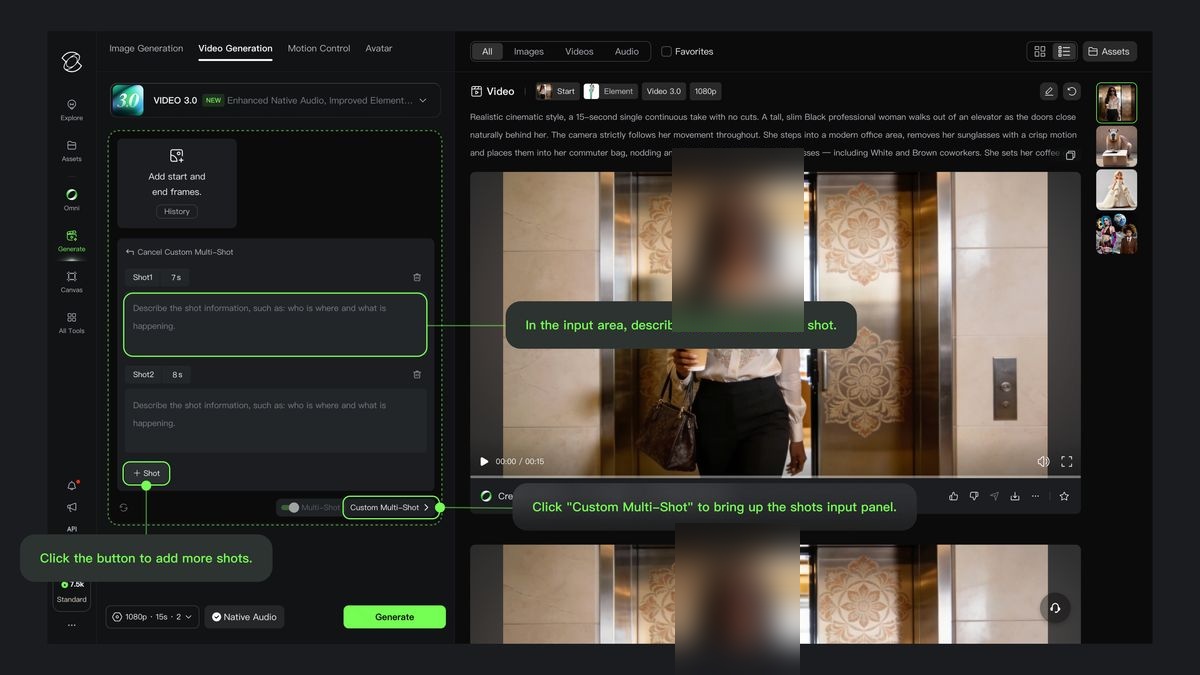
- Multi-Shot: It's like having an AI director, giving you cinematic videos with one click: Imagine telling your AI to create a scene, and it automatically plans camera angles and transitions. That's what the new Multi-Shot feature does! You can even use 'Custom Multi-Shot' for very detailed control over your video plan. It knows how movies are made, making complicated video parts easy to do.
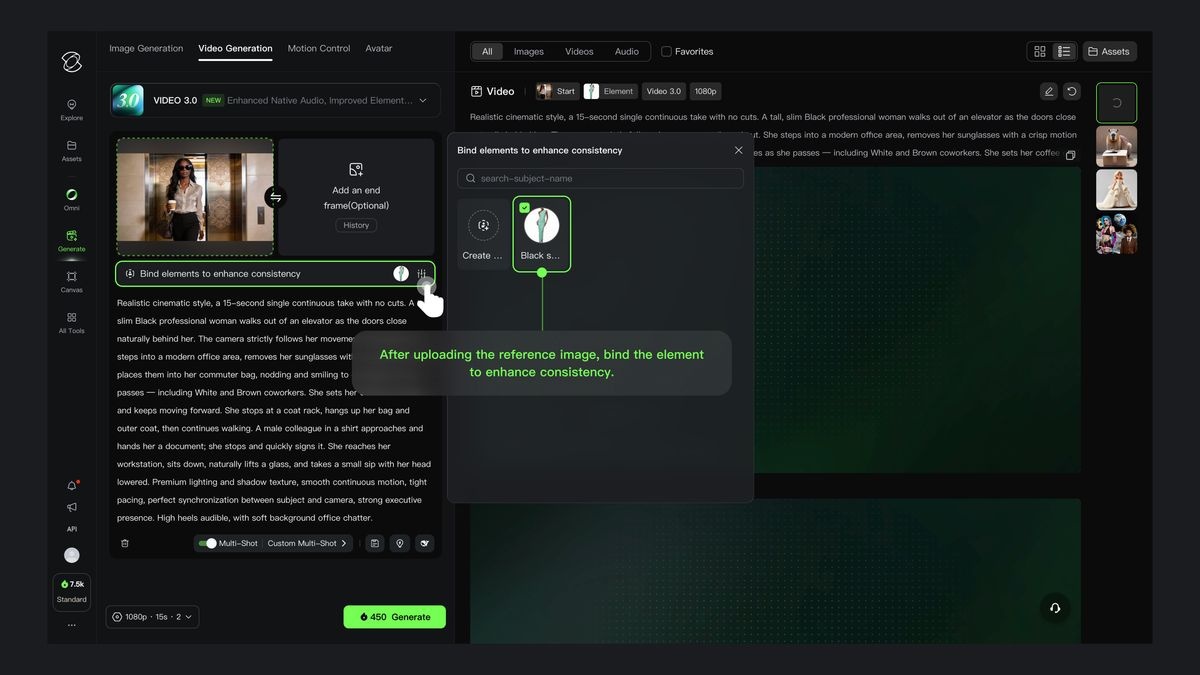
- World's First: Image-to-Video + Better Subject Consistency: This is a game-changer. Kling 3.0 can now 'lock in the traits of characters, items, and the scene' (Official Source). This means your main character's hoodie won't suddenly change color or texture between cuts. An expert review pointed this out, saying: 'Consistency: The “Elements” feature nailed the hoodie. It didn’t turn into a different jacket or change colors between cuts. Importantly, it also handled the text perfectly.' (Expert Review).
- Better Sound That Matches Characters & More Languages: No more generic voiceovers! The system can perfectly match what's said with who's saying it on screen, so you can say exactly who speaks in scenes with multiple characters. It also supports many languages, regional ways of speaking, and even smoothly switches between languages within one scene (Official Source).
![the element in [@image2] is running in the desert, with the camera pushing in to a close-up of the face in [@image1].](https://cdn.jsdelivr.net/gh/ysrg2003/latest-ai-assets@main/images/2026-03/1774284884_asset-klingai-enters-the-3.jpg)
What It Can Do: Features and How You Use It
The Kling VIDEO 3.0 has a lot of new features, giving you many new tools to use. Key additions include:
- Multi-Shot: For dynamic scene and camera angle adjustments.
- Start Frame + Element Reference: To maintain visual consistency of specific objects or characters.
- Multi-Character Coreference (3+): For complex dialogues and interactions.
- Multilingual Support (Chinese, English, Japanese, Korean, Spanish) & Dialects and Accents: Expanding global reach and realism.
- 15s Output Duration & Flexible Duration: Allowing for more complex narratives in a single generation.
Beyond these, Kling 3.0 also offers 'Super Clear Text Output', so signs and captions in your videos will look super clear and real (Official Source). But wait, there's a catch. As one expert noted, 'High-quality video generation burns through credits fast, especially when you have to iterate to get the perfect shot.' (Expert Review). So, while it can do amazing things, if you're watching your budget, you'll need to be careful with how much you use it.
What People Are Saying: The Good, The Bad, and How to Deal With It
I dug into the forums and expert reviews so you don't have to! Honestly, people are both amazed and a bit frustrated with Kling 3.0. While its main features get a lot of praise, some big problems have come up:
- Cost: This is a common complaint. As one expert review pointed out, 'It’s expensive. High-quality video generation burns through credits fast.' (Expert Review). This is like what we've seen with other advanced tools, such as those in our review of Kling 3.0 on Higgsfield, where you always have to think about how much the cool features cost to use. If you're planning big projects or if you need to try things many times, those credits can vanish fast.
- Speed: It can be slow. 'Slow: Kling 3 Pro took 3+ minutes to render some of these, compared to Grok which might do it in 30 seconds.' (Expert Review). For creators on tight deadlines, this difference in how long it takes can be a reason not to use it.
- Artistic Style Limitations: While it's great for making things look real, it has trouble with certain art styles. 'Abstract/Design: It struggles a bit with visuals that are more design-heavy or illustration-based.' (Expert Review). If you want to make very stylized or abstract art, you might find yourself struggling to get what you want from the AI.
- Small Consistency Issues: Even with all its improvements, some users still report problems. For multi-shot videos, 'color grading often shifted between cuts' and getting professional quality meant 'heavy iteration and specific prompting' (Expert Review). This means you'll still need a sharp eye and a lot of patience to get exactly what you want.
While there aren't many easy tricks yet because it's so new, everyone agrees that using careful, detailed instructions and being realistic about how long it takes to try things are important ways to work around these issues for now.
Other Options & What Else Is Out There
Kling 3.0 isn't the only player out there. It's stepping into a very competitive space. Many experts consider it 'on par with Veo 3.1, and possibly better in some ways' (Expert Review), making it one of the best all-around AI video tools. However, for specific things you want to do, other tools are still good options. For example, while Kling 3.0 is great at making things look real, tools like CapCut's Seedream 4.0 have changed how AI videos are made with their focus on 4K and speed, giving creators different benefits. 'If you just need simple image-to-video or you’re working with more abstract, design-heavy visuals, Grok is still a strong contender. It’s often faster, cheaper, and handles graphic elements a bit better.' (Expert Review). So, while Kling 3.0 is a very powerful tool, it doesn't work for absolutely everyone.
I agree with what most people are saying: 'Overall, Kling 3 is likely the best general-purpose video model on the market right now. It is a massive improvement over version 2.6 and currently sits equal to – or slightly above – Veo 3.1.' (Expert Review). It's a big jump forward, but the "best" tool always depends on what you specifically need and how much you want to spend.

A Quick Tip & What I Recommend
So, what should you do now? Here's the deal:
- For Most People: If you're a hobbyist, content creator, or someone who builds things, and you're looking for a powerful, all-around AI video tool, Kling 3.0 is probably your best bet. 'This tool will meet the needs of 90% of creators, 90% of the time.' (Expert Review). Its consistency and multi-shot capabilities are really amazing.
- For the Pros: Top-level professionals might still find things missing. It’s not perfect, especially when it comes to very specific artistic styles or tight deadlines. Be ready to try things many times and learn how to use it well.
- Just Try It Out!: Don't wait for perfection. 'In this field, if you wait for the “perfect” tool, you’ll never finish anything.' (Expert Review). Dive in, experiment, and see how it fits what you do.

My Final Verdict: Should You Use It?
Kling 3.0 is a super advanced step forward in all-around AI video making. It offers amazing consistency and new multi-shot features that really show what's possible. For creators who want realistic, story-based videos, it's a great helper. However, its high cost and occasional struggles with abstract art styles mean you need to think carefully about its powerful features compared to how you work, your budget, and what kind of art you want to make. It's a tool that requires you to spend money and time learning it, but the payoff for many will be a big improvement in how good your videos look and how fast you can make them.
Frequently Asked Questions
-
Given Kling 3.0's cost and rendering speed, is it really a good choice for independent creators or small studios on a budget?
While Kling 3.0 offers amazing features, its higher cost and slower rendering times can be a challenge for creators watching their money. It's important to compare what it can do with your project's money and time limits, maybe just using it for important parts of your video, not the whole thing.
-
Kling 3.0 talks about 'enhanced subject consistency,' but some users mention small issues. How reliable is this feature for complex videos with many shots?
Kling 3.0's consistency is a big step forward, especially for single-shot elements. For complex videos with many shots, while much better, getting perfect consistency might still need careful instructions and trying things many times, especially with small details or changing light.
-
With its focus on realism, will Kling 3.0 limit my creative freedom if I want to make more abstract or highly stylized video content?
Kling 3.0 is great at making realistic and story-based videos. If you want to make very abstract or design-focused art, you might find it hard to get the look you want without a lot of detailed instructions or extra work after the video is made, as the AI is best at making things look real and keeping characters/items consistent.
Sources & References
- Kling AI: Next-Generation AI Creative Studio
- Kling AI: Next-Generation AI Creative Studio
- docs.kie.ai
- Error 404 (Not Found)!!1
- Kling VIDEO 3.0 Model User Guide
- [2512.16776] Kling-Omni Technical Report
- Kling 3.0 AI Video Is Here: My 100% Honest Review | Chase Jarvis
- Kling 3.0 Tested: Real Results, No Hype (Review) - YouTube
- NEW Kling 3.0 Honest Review & Tutorial - Product Commercial Example - YouTube
- Just a moment...
- Kling 3.0 Review: The New King of AI Video Generators — Curious Refuge
- Kling 3.0 Review: Features, Pricing & AI Alternatives (2026) - Atlas Cloud Blog

Yousef S. | Latest AI
AI Automation Specialist & Tech EditorSpecializing in enterprise AI implementation and ROI analysis. With over 5 years of experience in deploying conversational AI, Yousef provides hands-on insights into what works in the real world.




