
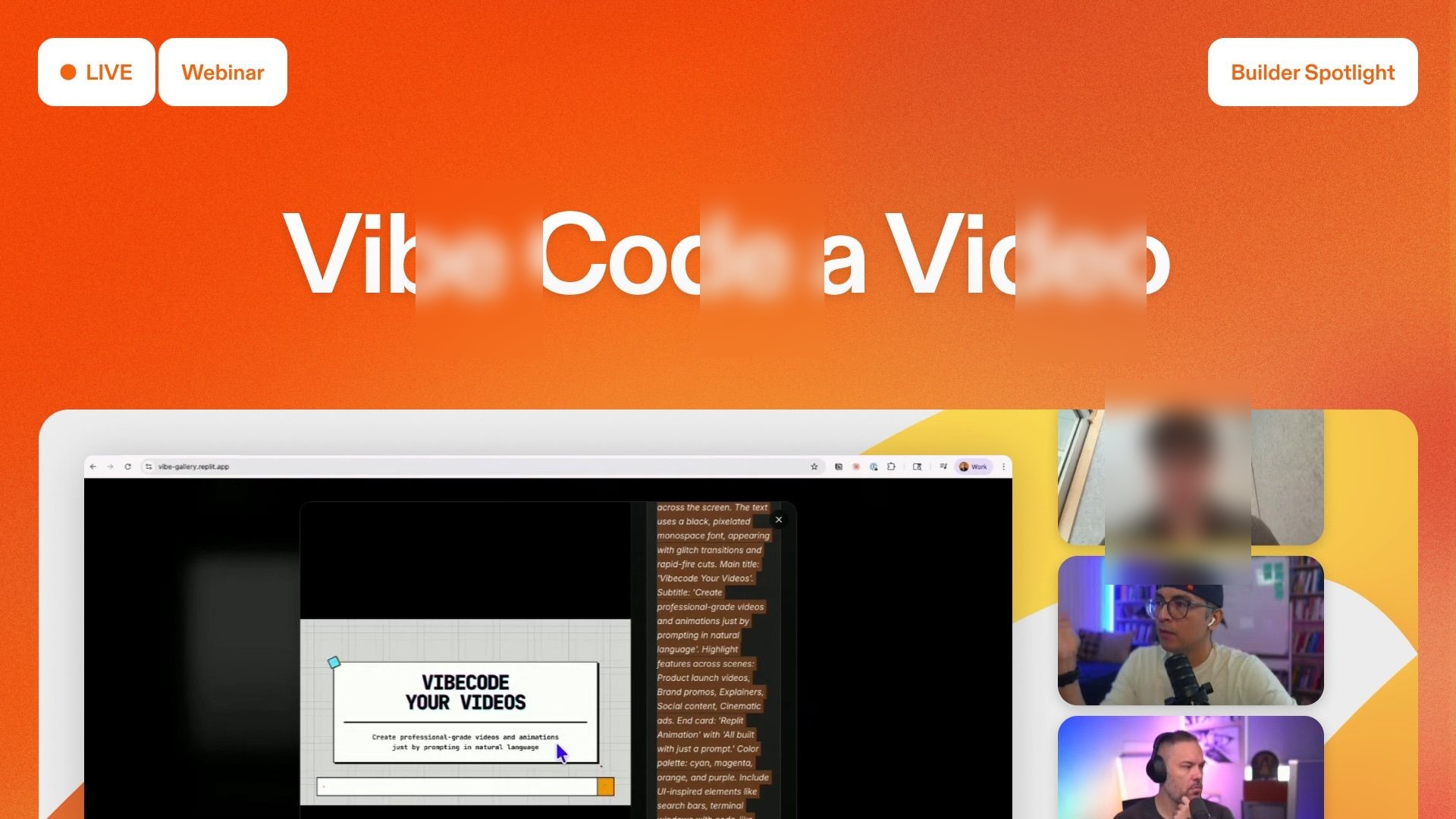
Replit Vibe Code Videos: Ship Motion-Style Launch Videos in Minutes
Imagine making a video for your product that could go viral in minutes! You don't need to hire an expensive studio or learn complex software. Replit Animation makes this dream come true.
So, can everyone really make professional-looking launch videos now? Or is this just more AI hype? I looked into Replit Animation, and here's what I found.
Replit Animation aims to make it possible for everyone to create professional, motion-style launch videos. It lets anyone 'vibe code' amazing content right within their usual work setup. This means you can skip traditional agencies and the need for specialized skills. Think of it as having a powerful motion graphics studio right inside your coding environment.
Table of Contents
- Quick 5-Step Action Plan
- Quick Overview: Replit Animation's Promise
- Technical Deep Dive: How Vibe Coding Transforms Video Creation
- Real-World Success: From Experiment to Viral Launch
- The Replit Animation Workflow: Iterate Like a Director
- Community Pulse: Why This Matters for Builders (and its Limitations)
- Replit's Broader Vision: Agentic Coding and the Future of Creation
- Practical Tip & Final Recommendation: Start Vibe Coding Today
- My Final Verdict: Who is this Guide for?
Quick 5-Step Action Plan
- Open Replit: Go to replit.com and start a new project (they call it a 'Repl').
- Select Animation Build Type: Inside your new project, choose the 'animation' option.
- Gather Assets: Get your stuff ready: any pictures of your product, logos, or important messages you want in the video.
- Vibe Code Your Prompt: Tell the AI agent what kind of launch video you want, using simple, everyday words.
- Iterate & Refine: Use the built-in 'prompt optimizer' to make your instructions even better. Then, tweak the scenes like a movie director until everything looks just right.
Quick Overview: Replit Animation's Promise
Honestly, Replit Animation is a total game-changer if you want to make professional-looking launch videos. But wait, this isn't just another AI video maker like Veo or Sora. It's a special tool that lets you 'vibe code' professional videos using everyday language, right inside your Replit workspace (Replit Blog).
The best part? You can create awesome, motion-style launch videos in minutes. It fits perfectly into how you already build things. This unique way of doing things makes it stand out from other tools we've checked out. Those often just focus on making videos from scratch, not on fitting into your development process.
Here's the deal: this powerful tool actually started as a test project inside Replit. It proved how good it was before anyone else even saw it. It's all about building your product and launching your video from the same spot, which makes everything super fast and easy.
| Feature | Replit Animation | Traditional Motion Graphics Studio | Generic AI Video Generators (e.g., Veo, Sora) |
|---|---|---|---|
| Cost | Low to Moderate (Replit subscription) | Very High (agency fees) | Low to Moderate (subscription) |
| Speed | Minutes to hours | Weeks to months | Minutes to hours |
| Skill Required | Natural language prompting (Vibe Coding) | Specialized design & software skills | Natural language prompting |
| Integration | Works smoothly with your coding process (in Replit) | External, separate process | Often standalone platforms |
| Iteration | Fast, right inside the platform | Slow, with many feedback rounds | Moderate, often means making a new video from scratch |
| Customization | AI helps guide changes, refine with prompts | Complete creative control | Limited by your prompt, less detailed control |
| Target User | Developers, founders, marketers | Big companies, brands with large budgets | Everyday users, content creators |
| Output Quality | Professional motion-style | Top-tier, custom-made | Varies, often has a typical AI look |
Technical Deep Dive: How Vibe Coding Transforms Video Creation
So, what exactly is 'vibe coding' when we talk about Replit Animation? It's a totally new way of doing things. You simply tell AI helpers what you want, using everyday language, and they write the code or create the content for you (Replit Guide).
Forget old-school storyboards, complicated timelines, or fancy motion graphics software. You just describe the launch video you want in simple words. This whole process is like having a motion graphics studio right there in Replit, ready to work for you.
You tell the AI helper what you're launching, who your audience is, and the general 'feel' you're going for. This means you completely skip the need for an expensive motion graphics agency. You can make changes super fast and keep the video exactly aligned with what you envision for your product. As Samuel, who works on product design at Replit, explains, "Replit animation allows you to vibe code professional motion style videos with natural language" (Replit Blog).
Here's a snippet of what a prompt might look like:
Help me create a minimalist maps app to visualize San Francisco’s parks. You should use leaflet for map visualization and fetch data from OpenStreetMap. Include the following OpenStreetMap data types for San Francisco: natural formations (woods, beaches, islet, cave entrance) and leisure (park, gardens).
This way, you get to focus on your big idea and your message, not on all the tiny, complicated technical details. It's a huge change from older ways, where even pro designers often don't have the specific skills needed for motion graphics.

Real-World Success: From Experiment to Viral Launch
The story of how Replit Animation came to be is really cool. It started as a design test by Samuel. He wondered if the same AI that made websites and presentations could also create animations. He gave it a shot on day one, and within just 30 minutes, he had a launch video that looked like a professional studio made it (Replit Blog).
Just two days later, the team suddenly needed a launch video for their 'Fast Mode' feature. There was no time to hire an outside agency, so they used Samuel's experimental video. The result? Samuel said, "We put that video on our social media, and it got over a million views without us paying for ads! I built this thing for just a few bucks, and I'm not even a motion designer" (Replit Blog).
Even Replit, a company with lots of resources, now makes many of its own launch videos using this tool. Why? Because it's super effective and saves a lot of money.
The Replit Animation Workflow: Iterate Like a Director
Getting started with Replit Animation is pretty easy, but a few simple habits will help you get the best videos. Manny, who manages Replit's community, and Samuel both highlight these important steps:
- Start in the Right Place: Always go to the 'app tab' and make sure you've picked the 'animation' project type.
- Lean on the Prompt Optimizer: This tool, built right in, can take your short idea and turn it into a detailed plan, scene by scene, with clear visual directions and style.
- Expect to Iterate: Your first video might be awesome, but you'll often want to make little changes. Try opening the same prompt in a few tabs and pick out the best bits from each.
- Edit Like a Director: If a scene isn't quite right, don't start from scratch! Just tell the AI helper things like "change the intro scene," "add more movement," or "make the transitions more exciting."
Manny showed this perfectly with a demo for Snap Circuits. He combined his voice-over with AI-made video clips, and the result was a video that looked like a professional studio made it, all done inside Replit (Replit Blog). The main thing to remember here is that you don't need to be a fancy motion designer or a prompt expert. You can just chat with the AI helper like you're working with a friend.
Community Pulse: Why This Matters for Builders (and its Limitations)
For anyone building things, the benefits of Replit Animation are super clear. It means you don't have to pick between launching your product and making a great video to show it off. You can do both!
You can build and launch at the same time, make quick changes to your video, and share it fast. All this happens right from the same place you build your apps and websites (Replit Blog).
This fits right into Replit's bigger goal: to make app creation easy for everyone and help with the shortage of developers, which experts say affects 82% of companies (Replit Guide). By making tough jobs like video creation easy to get into, Replit helps more people become creators.
But wait, there's a catch. It's also good to know about some possible limits. Free Replit accounts have some limits on things like computer power (CPU), memory, and storage space. Also, your projects are public by default unless you pay for an upgrade. And some super advanced tools or system parts might not be there (Replit Guide).
While it's awesome for trying out ideas and learning, if you're making something really big for a lot of people, you might want to move your code to your own computer or a cloud service. If you want to learn more about what it can do and where its limits are, our other article, Replit Animation: Your AI Guide to Programmatic Motion Graphics (and Its Current Limits), might be really helpful.
Replit's Broader Vision: Agentic Coding and the Future of Creation
Replit Animation isn't just a cool feature on its own. It's a perfect example of a bigger trend Replit is leading: 'vibe coding' and 'agentic coding'. This new way of thinking is all about focusing on your ideas and what you want to achieve, rather than getting bogged down in how the code actually works.
It's about jumping on board with how fast AI is growing – its abilities are actually doubling every seven months (Replit Guide). As Andrej Karpathy, a well-known expert, once said, "There's a new kind of coding I call 'vibe coding', where you fully give in to the vibes, embrace exponentials, and forget that the code even exists."
Replit is leading the charge to make this happen. They're helping people who aren't tech experts create things, and they're making developers' work easier by adding AI helpers that can assist with every step of building a project (Replit Guide).
Practical Tip & Final Recommendation: Start Vibe Coding Today
My advice? Don't just read about this; give it a try yourself! The best way to really get how powerful Replit Animation is to actually use it. You don't need to be a fancy motion designer, a video editor, or even a prompt expert. That's the beauty of it! This tool is so great because it's easy for everyone to use.
Just open Replit, choose the animation project type, add some of your own images or logos, and 'vibe code' your very own video that's ready to launch (Replit Blog). Chat with the AI helper like it's a teammate, telling it what you imagine in simple words. Play around with different prompts, make changes to your scenes, and watch your ideas turn into reality.
My Final Verdict: Who is this Guide for?
Replit Animation is a powerful tool that's easy to use. It helps anyone create professional, motion-style launch videos quickly and without breaking the bank, all within their usual work setup. This guide is for you if you're a Non-technical Founder, Product Owner, Marketer, or Developer looking for tools to quickly build and test ideas. If you're sick of expensive agencies, slow back-and-forth changes, or complicated software, Replit Animation is a really good choice. It makes a skill that used to be only for experts available to everyone. This means making great video content becomes a smooth, built-in part of how you launch your product.
Frequently Asked Questions
-
Is Replit Animation suitable for complex, bespoke video projects?
Replit Animation is fantastic for quick, professional-looking videos for launches and marketing. But for super complex or totally unique projects that need very specific custom animations and artistic touches, traditional studios might still be a better fit. However, for most business and product needs, what it can do is surprisingly strong.
-
How is 'vibe coding' different from the usual way of writing prompts for video?
'Vibe coding' is all about talking to the AI in a more natural, chatty way. You focus on what you want the video to achieve and how it should 'feel,' instead of giving exact technical commands. Traditional prompt engineering often needs special keywords and formats. But with vibe coding, you can chat with the AI helper like a creative partner, telling it your vision in simple, everyday words.
-
Can I easily use Replit Animation videos with my current marketing tools?
Totally! Once you've made and polished your video in Replit Animation, you can save it in common video formats. This makes it super easy to upload to YouTube, social media, your website, or any other place you market your stuff. It's built to make the whole process, from making the video to sharing it, really smooth.
Sources & References
- Official Source
- Replit — Vibe Code Videos in Replit: Ship Motion-Style Launch Videos in Minutes
- Replit: The Cloud IDE Built for Instant Coding, Prototyping, and AI Development | Data Science Dojo
- Replit — What is Vibe Coding? How To Vibe Your App to Life
- Replit Docs
- Error 404 (Not Found)!!1
- Build Dashboards & Visualize Data with AI | Replit
- Vibe Coding 101 with Replit - DeepLearning.AI
- Visual Debugging on Replit: A Step Towards Intuitive Learning in Coding | by Carl Kho | Medium
- I Took a Popular Vibe Coding Course and Built a Sample App - DEV Community
- Error 404 (Not Found)!!1
- Brutally Honest Replit Review (Not Sponsored) - YouTube
- Replit Vibe Coding Review & Alternatives 2026
- I built a free, local, open-source alternative to Replit

Yousef S. | Latest AI
AI Automation Specialist & Tech EditorSpecializing in enterprise AI implementation and ROI analysis. With over 5 years of experience in deploying conversational AI, Yousef provides hands-on insights into what works in the real world.




