

NVIDIA NemoClaw: The Privacy & Security Upgrade OpenClaw Needs (and Its Early Limitations)
OpenClaw promises personal AI, but how do you trust it with your data? NVIDIA NemoClaw, officially unveiled at GTC 2026, aims to solve this, but is it ready for prime time?
Quick Overview: The Official Pitch vs. The Reality
NVIDIA recently unveiled NemoClaw at GTC 2026, an open-source stack that adds important privacy and security controls to the OpenClaw agent platform. NVIDIA CEO Jensen Huang emphasized the significance, stating, "OpenClaw opened the next frontier of AI to everyone and became the fastest-growing open source project in history." He further likened OpenClaw to the 'operating system' for personal AI, with NemoClaw designed to provide the necessary security and privacy guardrails.
The official pitch is exciting: set up more secure, always-on AI assistants with a single command. It promises to give developers the confidence to build and run AI assistants, knowing their data and work is safe.
However, here's the deal: NemoClaw is currently in an 'early preview' or very early 'Alpha' stage (NVIDIA Official Documentation). This means it's not ready for serious, everyday use. As I've seen with many early releases, you should expect some bumps and changes to how it works.
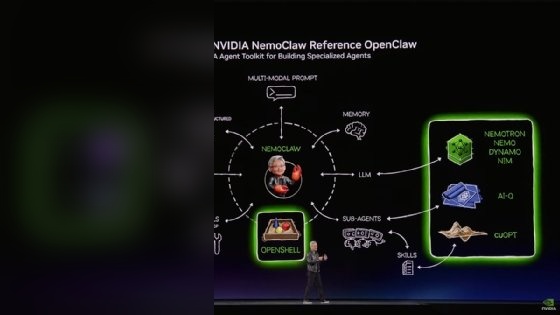
Table of Contents
Watch the Video Summary
A Closer Look: How NemoClaw Keeps OpenClaw Safe
So, how does NemoClaw actually work its magic? It uses NVIDIA Agent Toolkit software and installs NVIDIA OpenShell to set up clear rules for privacy and security (NVIDIA Official Documentation). Think of OpenShell as a digital bouncer for your AI agent, controlling what data goes in and out, and what tasks it can perform.
These strong rules are super important for building truly secure AI agents, a concept we talked about more in our previous article, Mastering NemoClaw: Secure Your OpenClaw AI Agents.
One of the best parts is its ability to figure out if your computer has enough power to run powerful open models, like NVIDIA Nemotron™, right on your device (NVIDIA Official Documentation). This is a game-changer for privacy and can really save you money by keeping your AI's brain on your own hardware. To get started, you'll need at least 4 virtual CPU cores, 8 GB of memory, and 20 GB of free space on your hard drive (NVIDIA Official Documentation).
Getting it up and running is surprisingly straightforward for an early-stage tool. NVIDIA provides a simple script:
$ curl -fsSL https://nvidia.com/nemoclaw.sh | bash
$ nemoclaw onboard
This single command starts an easy setup guide, setting up a safe, isolated space for your OpenClaw agent.
$ curl -fsSL https://nvidia.com/nemoclaw.sh | bashNVIDIA NemoClaw's Position: A Comparative Analysis within the OpenClaw Ecosystem
The rapid rise of OpenClaw, while revolutionary for personal AI, brought significant security challenges. OpenClaw's inherent design granted unfettered access to user machines, allowing agents to execute code and access the internet, which led to concerns about supply chain attacks, data leakage, and unintended actions like deleting emails. Its practice of storing API keys and secrets in local files with broad operating system access made it particularly vulnerable to compromise.
In response to these vulnerabilities, other solutions have emerged. Notably, NanoClaw offers a security-first, minimalist approach. It isolates a stripped-down version of the OpenClaw agent within Docker containers, further enhanced by microVM isolation in Docker Sandboxes. This architecture strictly sandboxes execution, preventing unauthorized access to the host machine's filesystem, network stack, or kernel, though it sacrifices some of OpenClaw's extensive integration ecosystem for this enhanced security.
NVIDIA NemoClaw, however, takes a different architectural stance, aiming to provide enterprise-grade security and privacy while maintaining compatibility with the broader OpenClaw ecosystem. NemoClaw centers on the OpenShell sandbox, which encapsulates the OpenClaw agent within a K3s-based sandboxed execution environment running in a Docker container. OpenShell enforces policy-based security, network, and privacy guardrails, acting as a "digital bouncer" for the AI agent. Furthermore, NemoClaw integrates a Privacy Router that actively monitors and controls the agent's behavior and communication, preventing sensitive data from leaving its secure confines without explicit policy approval. This multi-layered approach, acting as a wrapper around OpenClaw, directly addresses the original platform's security gaps by providing a robust infrastructure layer for secure deployment and data governance.
More Control: How It Works and Keeps Your Data Safe
NemoClaw provides a strong, safe place for your smart AI helpers. It's designed for running all the time on your own systems like NVIDIA GeForce RTX™ PCs/laptops, NVIDIA RTX™ PRO workstations, and NVIDIA DGX Station™ or DGX Spark™ (NVIDIA Official Documentation). This means your personal AI can be truly personal, running on your own hardware without always needing to connect to online services.
The main way it stays secure is by enforcing its rules. When your AI agent needs to 'think' or get information (we call these 'inference requests'), they don't just go straight out of its safe space (NVIDIA Official Documentation).
Instead, OpenShell catches every request and sends it through a special NVIDIA cloud service that's carefully managed, making sure your data doesn't just float away unprotected online. The safe space starts with a set of basic, strict rules. These rules control things like what information can leave your computer (outgoing network traffic), what files it can look at, what programs it can run, and how it gets its answers (NVIDIA Official Documentation). This is like giving your AI agent a very specific set of rules it cannot break.
Advanced Security Features and Mechanisms
- Federated Learning: NemoClaw's emphasis on local model inference and controlled cloud access via the Privacy Router creates an environment conducive to federated learning. This approach allows AI models to be trained across decentralized datasets residing on local devices (like NVIDIA RTX PCs) without exchanging raw data, only aggregated model updates. NVIDIA's broader ecosystem, including NVIDIA FLARE, already supports homomorphic encryption for federated learning to further enhance data privacy during model aggregation.
- Homomorphic Encryption (HE): The concept of homomorphic encryption, which allows computations on encrypted data without decryption, is a powerful tool for maintaining data confidentiality. While not a direct feature of NemoClaw's current runtime, NVIDIA has extensively researched and developed HE solutions (e.g., in Clara Train and with ArctyrEX). NemoClaw's secure execution environment and privacy router could theoretically integrate with such HE capabilities for highly sensitive computations, ensuring data remains encrypted even during processing.
- Differential Privacy: NemoClaw's policy-based guardrails and focus on controlled data egress through OpenShell and the Privacy Router inherently support the principles of differential privacy. By strictly limiting what data leaves the local environment and how it's processed, NemoClaw helps minimize the risk of individual data points being re-identified in aggregated results, contributing to a stronger privacy posture for AI agents.
- Secure Multi-Party Computation (SMC): The isolated sandboxing provided by OpenShell, combined with the Privacy Router's controlled communication channels, creates a secure foundation that could facilitate secure multi-party computation. SMC allows multiple parties to jointly compute a function over their inputs while keeping those inputs private. NemoClaw's ability to manage secure, isolated execution environments on local hardware makes it a potential platform for future integrations of SMC protocols for collaborative AI tasks requiring extreme data confidentiality.
Real-World Impact and Enterprise Adoption Scenarios
NVIDIA NemoClaw directly addresses critical enterprise challenges that have hindered the widespread adoption of autonomous AI agents like OpenClaw. The original OpenClaw, while powerful, presented significant risks due to its unfettered access and lack of inherent security controls, leading to concerns about data leakage, compliance, and auditability. NemoClaw's introduction aims to transform OpenClaw into an enterprise-grade platform, enabling secure deployment of AI agents in sensitive environments.
Specific enterprise challenges NemoClaw aims to solve include:
- Secure Deployment of Autonomous Agents: In industries like finance, healthcare, and legal, AI agents handling sensitive client data or proprietary information require robust isolation. NemoClaw's OpenShell sandbox ensures that agents operate within defined boundaries, preventing unauthorized access or malicious behavior, even if the agent itself is compromised.
- Data Governance and Compliance: Enterprises face stringent regulatory requirements (e.g., GDPR, HIPAA). NemoClaw's policy-based guardrails and Privacy Router provide granular control over what data an agent can access, process, and transmit, ensuring adherence to internal policies and external regulations. This is crucial for maintaining audit trails and demonstrating compliance.
- Mitigating "Shadow Agents": The ease of deploying OpenClaw could lead to "shadow agents" operating outside IT oversight. NemoClaw provides a standardized, controlled environment for agent deployment, giving IT departments the necessary tools for governance, observability, and auditability.
Consider a hypothetical scenario in a financial institution: an AI agent is tasked with analyzing market trends and executing trades. Without NemoClaw, a flaw in the agent or a malicious prompt could lead to unauthorized data exposure or erroneous transactions. With NemoClaw, the agent operates within an OpenShell sandbox, its network traffic is routed through a Privacy Router, and its actions are strictly governed by predefined policies. This ensures that sensitive financial data remains secure and that trading decisions adhere to compliance rules, even as the agent operates autonomously. Similarly, in healthcare, an AI agent managing patient records could leverage NemoClaw to ensure that data processing occurs locally and sensitive information is never exposed to external cloud services without explicit, secure routing.
As NVIDIA CEO Jensen Huang stated, "Every company in the world today needs to have an OpenClaw strategy," emphasizing the shift towards agentic systems and the critical need for secure infrastructure like NemoClaw to realize this future.
Talking to Your AI: The Safe Space and Command Line
Once NemoClaw is installed, talking to your OpenClaw AI in its safe space is pretty easy. The nemoclaw onboard command starts an easy setup guide that walks you through getting everything ready (NVIDIA Official Documentation). After that, you can connect to your safe space using nemoclaw <name> connect and chat with your agents through either the OpenClaw TUI (a text-based screen) or the CLI (by typing commands) (NVIDIA Official Documentation).
I found the TUI great for chatting back and forth, while the CLI is better for getting longer answers, like when it writes code, right in your command window (NVIDIA Official Documentation). The fact that it processes AI tasks right on your device (we call this 'local model inference') is a huge plus. It makes things more private and saves you money (NVIDIA Official Documentation).
──────────────────────────────────────────────────
Sandbox      my-assistant (Landlock + seccomp + netns)
Model        nvidia/nemotron-3-super-120b-a12b (NVIDIA Cloud API)
──────────────────────────────────────────────────
Run:         nemoclaw my-assistant connect
Status:      nemoclaw my-assistant status
Logs:        nemoclaw my-assistant logs --follow
──────────────────────────────────────────────────

[INFO]  === Installation complete ===
What Early Users Think: Things That Aren't Perfect Yet
As much as I love the promise of NemoClaw, it's important to remember its 'alpha software' status. NVIDIA is honest about this, saying it's still 'very new' and users should 'expect rough edges' (NVIDIA Official Documentation). This 'alpha software' label, as we talked about before in NVIDIA NemoClaw: OpenClaw's Enterprise Evolution with Guardrails – An Alpha Deep Dive, means users should be careful.
When I looked at the official warnings, a few important things stood out:
- Not Ready for Everyday Use: This is the biggest takeaway. Do not use NemoClaw for really important, everyday work without a lot of testing and knowing what it can't do yet (NVIDIA Official Documentation).
- Things Might Change: Be prepared for changes that could break your existing work. If you're building on NemoClaw today, your code might need tweaks when new versions come out.
- Some Features Are Still Being Built: Specific
openclaw nemoclawplugin commands are still being actively developed. This means some parts might not be finished, or you might have to do some things manually (NVIDIA Official Documentation). - Tricky Setup Sometimes: While generally smooth, some platforms might require manual steps to get it working, especially with certain software (like container runtimes) or computer parts (NVIDIA Official Documentation). For instance, macOS with Podman isn't fully supported yet.
These aren't really complaints, but more like important warnings for anyone looking to jump in early. It's a platform for trying things out and giving feedback, not for super important projects just yet.

Comparing Options: Running AI on Your Computer vs. Online, and Other Choices
NemoClaw's way of processing AI tasks is a mix of two things. It focuses on running powerful AI models like NVIDIA Nemotron™ right on your computer. This is great for privacy and makes things run faster.
However, it also includes a special privacy tool that lets your AI connect to powerful online AI models, so they can learn new things, but always within the safe rules you've set (NVIDIA Official Documentation). This means you get the best of both worlds: local control for sensitive tasks and access to powerful cloud models when needed, all while keeping those security rules in place.
For those who just want to run AI completely on their own computer, options like Ollama and vLLM are mentioned as other tools you might try, or things NemoClaw might work with later (NVIDIA Official Documentation). This shows NVIDIA knows about other local AI tools out there and might mean more options for you in the future.
The way it sets things up, using the OpenShell command line to manage resources, makes sure everything is organized and safe when you deploy your AI (NVIDIA Official Documentation).
| Metric | NVIDIA NemoClaw (Local) | Typical Cloud API (Direct) | Experimental Local (e.g., Ollama) |
|---|---|---|---|
| Minimum RAM | 8 GB (NVIDIA Official Documentation) | N/A (Cloud-managed) | 8 GB (for smaller models) |
| Control Over Data Leaving Your Computer | 100% (via OpenShell) | 0% (direct to cloud) | 100% (local) |
| Estimated Cost Per AI Task | $0 (after hardware investment) | Variable (e.g., $0.001/1k tokens) | $0 (after hardware investment) |
| Ready for Everyday Use? | Alpha Software | Production-ready | Experimental |
| How Hard to Set Up? | Moderate | Low | Moderate |
sandbox@my-assistant:~$openclaw agent --agent main --local -m"<prompt>"--session-id<id>A Handy Tip & My Final Advice
For developers and AI enthusiasts, NemoClaw offers a great place to try things out early and give your thoughts to help improve a really important project that's still growing (NVIDIA Official Documentation). If you're serious about building secure, private AI agents, this is definitely something to keep an eye on, and even better, to start playing around with it.
However, as I've stressed, users should be very aware that it's still in its early 'alpha' stage and not use it for important, everyday work without thinking it through and testing it a lot (NVIDIA Official Documentation).
The main promise—helping you build and run AI assistants with more peace of mind because of better security and privacy—is super powerful (NVIDIA Official Documentation), but it's still got a way to go before it's fully ready.
sandbox@my-assistant:~$openclaw agent --agent main --local -m"hello"--session-idtestMy Final Verdict: Should You Use It?
NVIDIA NemoClaw offers an exciting, though still new, way to make OpenClaw much safer and more private. If you're an AI developer, someone who designs computer systems, or just really cares about privacy with AI, it's a useful tool for trying out safe personal AI helpers. If your main worry is keeping your data private and having your AI run on your own computer, and you're okay with using software that's still in its early stages, then jumping into NemoClaw for building and testing is a good idea. It's a chance to shape the future of secure personal AI.
However, if you need a solution today that's ready for everyday use, guaranteed to be stable, and has lots of help guides, NemoClaw isn't quite there yet. In that case, I'd recommend sticking with well-known online AI platforms that have ready-to-use tools and strong support, or looking into other, more stable ways to run AI locally, like setting up Ollama, for projects that aren't super sensitive or are just for fun, until NemoClaw matures.
Frequently Asked Questions
-
Can I use NemoClaw for important, everyday work right now?
No, NVIDIA NemoClaw is currently in an 'early preview' or 'Alpha software' stage. It is not ready for everyday use, and users should expect bumps, changing features, and potential issues. It's best suited for trying things out and building test projects.
-
How does NemoClaw make my personal AI agents more private?
NemoClaw makes things more private by using NVIDIA OpenShell to set up clear rules for security. It focuses on running powerful AI models right on your computer. It also makes sure that when your AI needs to 'think,' its requests never leave its safe, isolated space directly. Instead, they go through a special NVIDIA cloud service that has strict rules about what data can leave.
-
What kind of computer do I need to run NemoClaw on my own device?
To get started with NemoClaw, you will need at least 4 virtual CPU cores, 8 GB of memory, and 20 GB of free space on your hard drive. It's made to run on your own computers, like NVIDIA GeForce RTX™ PCs/laptops, NVIDIA RTX™ PRO workstations, and NVIDIA DGX Station™ or DGX Spark™.
Sources & References
- Safer AI Agents & Assistants with OpenClaw | NVIDIA NemoClaw
- NVIDIA Corporation - NVIDIA Announces NemoClaw for the OpenClaw Community
- GitHub - NVIDIA/NemoClaw: NVIDIA plugin for secure installation of OpenClaw · GitHub
- Page Not Found | NVIDIA
- Nvidia NemoClaw, JFrog shore up OpenClaw security | TechTarget
- Architecting the Agentic Future: OpenClaw vs. NanoClaw vs. Nvidia's NemoClaw - DEV Community
- Medium
- Source
- Nvidia NemoClaw | Hacker News
- NVIDIA NemoClaw Open-Source AI Agent 2026: Enterprise Guide - AICC - AI.cc

Yousef S. | Latest AI
AI Automation Specialist & Tech EditorSpecializing in enterprise AI implementation and ROI analysis. With over 5 years of experience in deploying conversational AI, Yousef provides hands-on insights into what works in the real world.




