
Moshi's Open-Source Edge: Local AI Deployment vs. Cloud Giants and Legacy Solutions
Are you tired of the delays, privacy worries, and the mystery of online AI for real-time chats? Well, get ready to discover how Moshi promises a totally new, open-source future for AI that talks back and forth, and you can even run it on your own computer.
Moshi: The Official Pitch vs. Reality
I've been checking out the newest stuff in conversational AI, and Kyutai's Moshi is making some serious waves. Here's the deal: the main idea here is super simple but really important. Moshi is an open-source AI that understands and generates speech at the same time, like a real conversation, and you can run it on your own computer.
Honestly, this isn't just another online service. It's a direct challenge to the delays and lack of control we've come to expect from old ways of handling speech and the secret, online-only AI models offered by big companies like OpenAI. It promises a future where your real-time AI conversations are fast, private, and you're totally in charge.
Table of Contents
- Moshi: The Official Pitch vs. Reality
- The Promise of Real-Time Dialogue: Moshi's Core Innovation
- Under the Hood: Moshi's Architecture for Local Performance
- Moshi's Performance & Real-World Edge
- Moshi vs. The Giants: Open-Source Local AI's Competitive Edge
- Community Pulse: What Developers Are Saying
- My Final Verdict: Is Moshi Right for Your Project?
Watch the Video Summary
The Promise of Real-Time Dialogue: Moshi's Core Innovation
Here's the deal: Moshi is a super innovative AI that can understand and create speech at the same time, like a real human conversation. What does 'full-duplex' mean? Think of it like a natural phone conversation where both parties can speak and be understood simultaneously, without awkward pauses or waiting for turns. This is a game-changer for truly natural conversational AI.
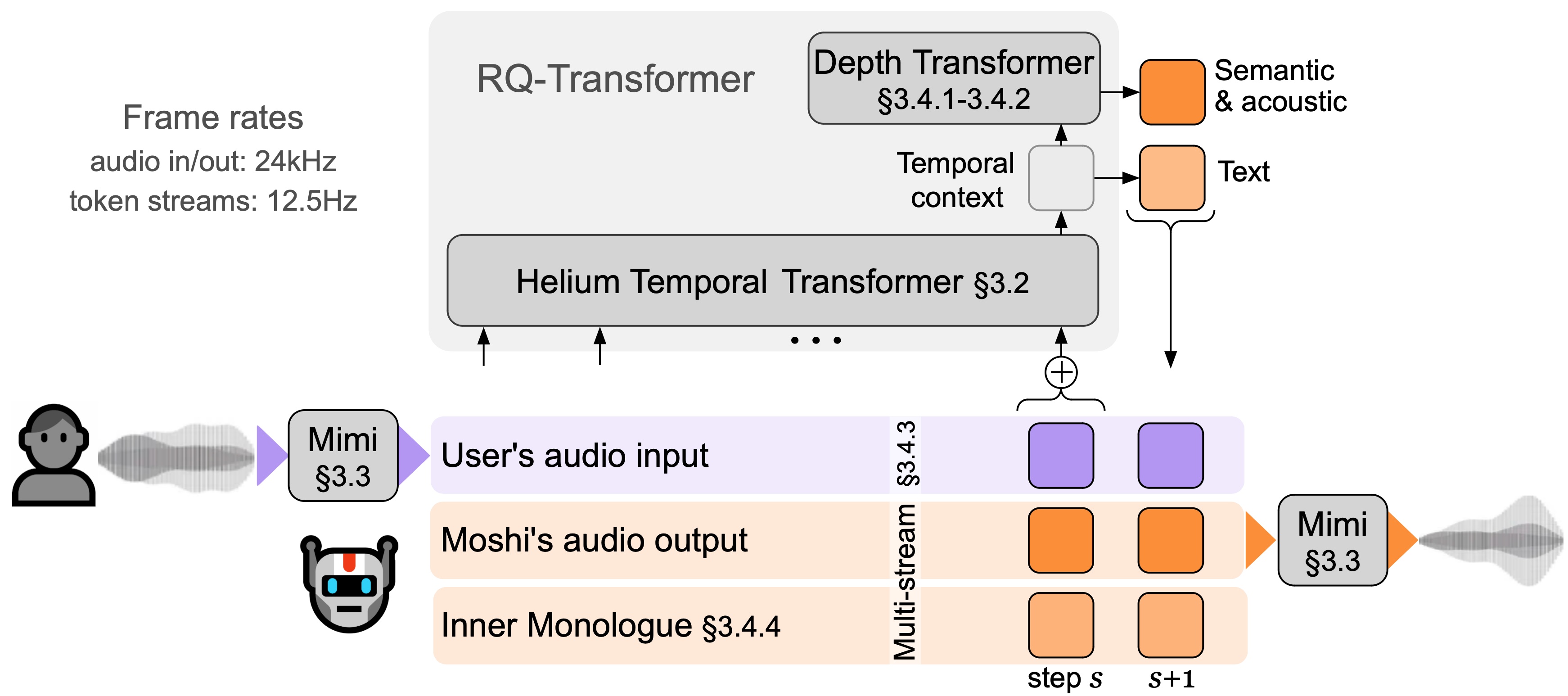
Moshi is super fast in real-time, with the fastest it could possibly be at just 160ms (80ms frame size + 80ms acoustic delay). What you'd actually experience is a practical overall delay as low as 200ms on an L4 GPU (arXiv, 2024). This directly addresses the biggest weakness of old-school speech systems that use many different parts, which often introduce several seconds of delay.
Those older systems also suffer from delays because they're so complicated, the loss of things like how you sound (not just the words) when converting everything to text, and you have to wait for your turn to speak, which feels unnatural. Moshi, backed by Kyutai and supported by some big names, aims to solve these issues by treating conversations as direct speech-to-speech, not breaking it down into text first (arXiv, 2024).
Under the Hood: Moshi's Architectural Innovations
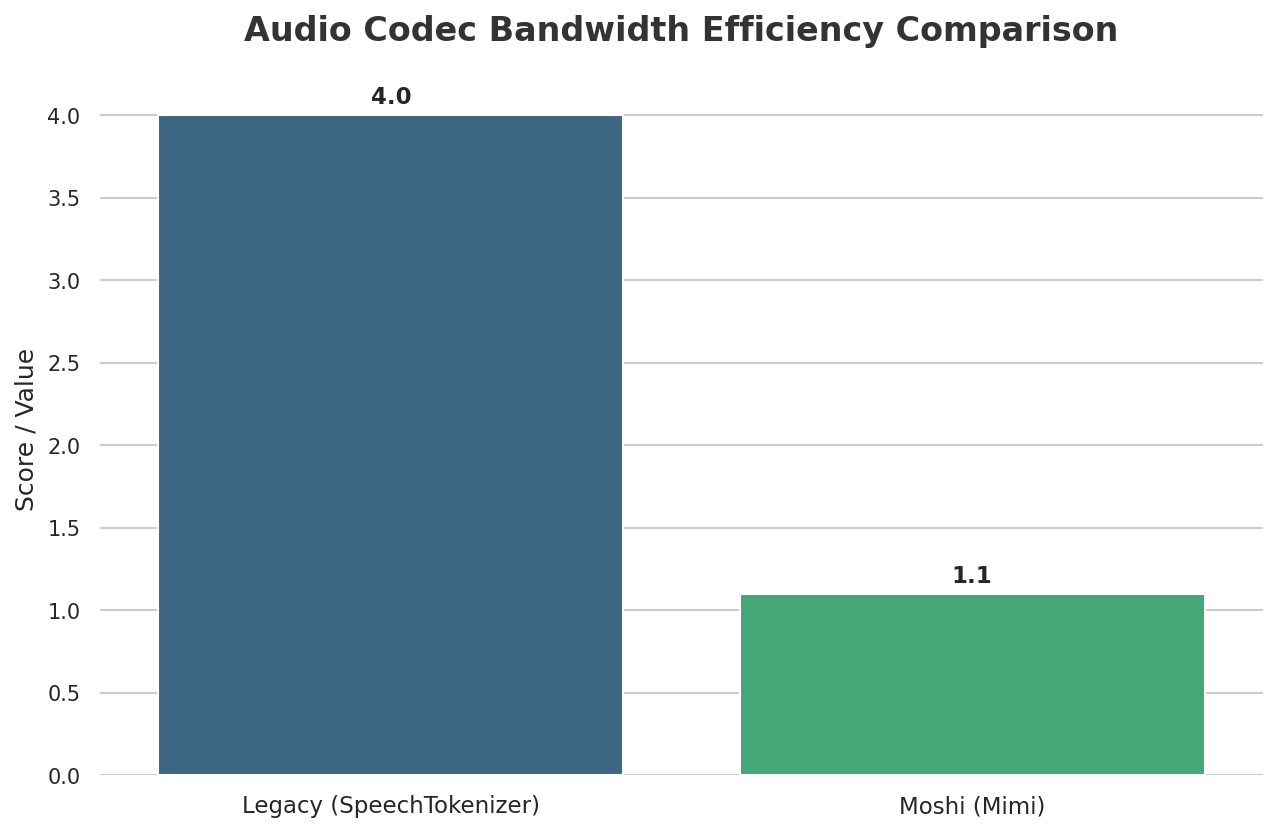
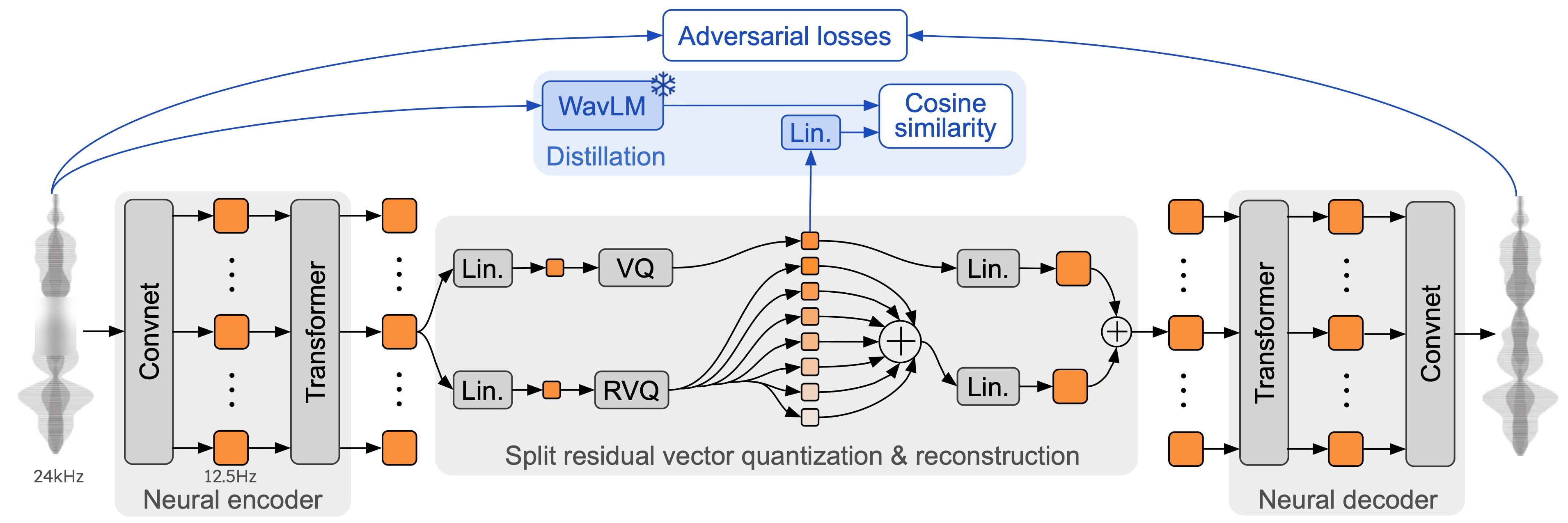
I looked at the technical details, and Moshi works thanks to some really smart tech. A key part of how it works is Mimi, a super advanced way to compress and stream audio. Mimi takes high-quality audio and shrinks it down to a tiny size, using very little internet data (1.1 kbps bandwidth), all with an 80ms delay. Mimi is a neural audio codec that processes 24 kHz audio down to a 12.5 Hz representation, maintaining ultra-low latency of 80ms, making it ideal for streaming Transformers. This design allows it to outperform existing non-streaming codecs like SpeechTokenizer and SemantiCodec in efficiency and performance.
My analysis shows it's better than other audio compression tools that aren't as fast, like SpeechTokenizer and SemantiCodec, which use more data and higher frequencies (GitHub, 2024). This speed is super important for real-time performance.
Moshi itself uses a smart trick: it thinks about its own speech and your speech at the same time. It basically talks to itself in text first, which makes its speech sound much better and more natural. This also lets it do real-time speech-to-text (ASR) and text-to-speech (TTS). At its core, Moshi is built upon Helium, a 7B language model trained on 2.1T tokens, providing strong reasoning abilities. It employs a novel multi-stream architecture that jointly models audio from the user and Moshi on separate channels, enabling true full-duplex conversational dynamics with overlap, backchannelling, and interruptions, eliminating the need for explicit speaker turns. A huge, smart AI brain (called a Temporal Transformer with 7 billion parts) manages all the tricky timing, making the conversation flow naturally (arXiv, 2024). This multi-stream approach, combined with an "Inner Monologue" training procedure that jointly models text and audio tokens, allows Moshi to fully leverage text knowledge while remaining a speech-to-speech system, crucial for its efficient local/edge deployment.
For developers, this flexibility is a huge win, offering a practical way for you to run real-time AI on your own computer, much like the detailed guidance explored in Moshi Unchained: A Developer's Hands-On Guide to Local Deployment of Kyutai's Real-Time AI. Moshi offers different ways to run the AI: PyTorch for trying things out and experimenting, MLX for running it directly on your iPhones and Macs, and Rust for strong, reliable setups for real-world use.
This means you can take Moshi from an early test on your laptop to a super fast program. Plus, Kyutai provides code for a simple web interface and even another place where you can tweak the AI to make it even better (GitHub, 2024).
pip install -U moshi#moshi PyTorch, from PyPIpip install -U moshi_mlx#moshi MLX, from PyPI, best with Python 3.12.#Or the bleeding edge versions for Moshi and Moshi-MLX.pip install -U -e"git+https://git@github.com/kyutai-labs/moshi.git#egg=moshi&subdirectory=moshi"pip install -U -e"git+https://git@github.com/kyutai-labs/moshi.git#egg=moshi_mlx&subdirectory=moshi_mlx"pip install rustymimi#mimi, rust implementation with Python bindings from PyPIHow You Can Use It: From Trying Things Out to Real-World Apps
This is where it gets really interesting for developers looking to put Moshi to work. Kyutai offers various versions of the AI voice models, including Moshiko (a male computer-generated voice) and Moshika (a female computer-generated voice), along with the Mimi speech codec. These models come with different ways to make them smaller and faster – bf16, int8, and even int4 – across the PyTorch, MLX, and Rust/Candle backends (Hugging Face, 2024).
Making the AI's internal numbers less precise (quantization) is key for running these powerful models on less powerful computers, making it possible to run them directly on your own devices.
For instance, running MLX locally is as simple as python -m moshi_mlx.local -q 4 for 4-bit smaller weights (GitHub, 2024). This on-device processing means your data stays local, making your data more private and giving you total control over your AI. The Rust backend, with its CUDA/Metal features, is clearly made for super fast, real-world uses, offering a strong and reliable option for real-world applications.
python -m moshi_mlx.local -q 4#weights quantized to 4 bitspython -m moshi_mlx.local -q 8#weights quantized to 8 bits#And using a different pretrained model:python -m moshi_mlx.local -q 4 --hf-repo kyutai/moshika-mlx-q4
python -m moshi_mlx.local -q 8 --hf-repo kyutai/moshika-mlx-q8#be careful to always match the `-q` and `--hf-repo` flag.
Moshi in Action: A Glimpse at the User Experience
So, what's it actually like to use Moshi? You can interact with it through a simple website or by typing commands. The usual setup involves starting a server with python -m moshi.server and then going to the website at localhost:8998 (GitHub, 2024). If you want to use it from another computer, there's a --gradio-tunnel option, but be warned: this can introduce big delays, potentially up to 500ms from Europe, as the tunnel routes through the US (GitHub, 2024).
It's important to note that the basic command-line tools don't have fancy features yet, like stopping echoes or fixing delays, which are super important for smooth conversations. Also, if you're not running it directly on your computer, using the microphone in the web UI over HTTP might cause issues due to your web browser's safety rules. On the technical side, you'll need Python 3.10+ (with 3.12 recommended) and potentially the Rust programming tools for the Rust backend, along with special software (CUDA) if you have a powerful graphics card (GitHub, 2024).
Moshi in Action: Real-World Performance & Deployment Insights
From a practical standpoint, Moshi demonstrates impressive real-time capabilities. It achieves a practical overall latency as low as 200ms on an L4 GPU, with a theoretical latency of 160ms (80ms frame size + 80ms acoustic delay). This low latency is crucial for natural, full-duplex conversations, where both parties can speak and be understood simultaneously without awkward pauses. Furthermore, Moshi's architecture is efficient enough to run in real-time on consumer-grade hardware like an M3 MacBook Pro, requiring only 12.5 passes through its 7B backbone for one second of audio.
However, real-world deployment can introduce variables. While local deployment offers optimal performance, using a --gradio-tunnel for remote access can add significant latency, potentially up to 500ms from Europe due to routing through the US. This highlights the trade-offs between local control and remote accessibility for real-time applications. Moshi's ability to operate offline on smaller devices also positions it as a potential game-changer for smart home appliances, enabling local, private AI interactions.
Moshi's Performance & Real-World Edge
When we talk about real-time conversational AI, performance is everything. I've put together a comparison to show you exactly where Moshi stands against other big names out there.
| Feature | Moshi (Kyutai) | OpenAI (GPT-4o) | Older Systems (e.g., separate speech-to-text and text-to-speech tools) |
|---|---|---|---|
| Latency (ms) | 200 (practical) (arXiv, 2024) | ~500+ (cloud-based, full-duplex deduction) | 2000-5000 (several seconds) (arXiv, 2024) |
| Data Control Score (1-5, 5=highest) | 5 (Full local control) | 2 (Limited, cloud-managed) | 3-4 (Varies by component) |
| Initial Hardware Investment (USD) | ~$500+ (for dedicated GPU) | 0 (API-based) | Varies (can be high for on-premise) |
| Deployment Model | Local, On-device (MLX), Production (Rust) | Cloud-hosted, API-based | Varies (on-premise or cloud, component-dependent) |
| Transparency | Open-source (CC-BY 4.0 license) (GitHub, 2024) | Proprietary, Black-box | Varies by component) |
Looking at the numbers, Moshi's low delay stands out a lot, especially for things where being super fast is key. While you'll need to buy some hardware first for a powerful graphics card, that initial cost means you won't pay for every time you use it later, and you get total control over your data.
Big cloud companies like OpenAI are easy to use and grow with you, but you give up some privacy and get slower speeds for really fast, back-and-forth conversations. Older systems, made of many separate parts, simply can't compete on speed or the ability to keep the feeling and tone of your voice.
Moshi vs. The Giants: Open-Source Local AI's Competitive Edge
This is where Moshi really finds its special place. When you compare it to secret, online-only AI services like OpenAI's GPT-4o, Moshi's benefits are super clear. OpenAI, while powerful, is a mystery box that lives in the cloud (OpenAI, 2024). You send your data to their servers, you depend on their computer systems, and you have to follow their rules and pay their prices.
Honestly, this model just doesn't have the good stuff you get from running AI on your own computer, like total control over your data and the transparency that open-source projects like Moshi offer. This difference between open-source and secret cloud services reminds us of bigger talks about who controls AI and how easy it is for everyone to use. It's like the ongoing debate about whether big companies or open communities should lead the way in AI voice tech.
Then there are older systems, which typically rely on a chain of separate parts: things like figuring out when someone is speaking, turning speech into text, understanding what you mean, and turning text into speech. This many-step process causes several seconds of delay and, importantly, loses the feeling and tone of your voice that's essential for natural conversation (arXiv, 2024).
Moshi, by contrast, deals with all these problems at once, making conversations flow naturally without needing people to take turns. Developed by Kyutai, a French AI research lab, Moshi is part of an "Open Science" initiative, with its source code for inference available under the Apache 2 license and model weights under the CC BY 4.0 license. This open-source approach, as stated by Kyutai, aims to enable the community and businesses to benefit from the latest AI advancements, fostering innovation and large-scale customization. Kyutai officially released Moshi's technical report, weights, and streaming inference code in PyTorch, Rust, and MLX, emphasizing its commitment to transparency and community contribution.
While other tools, like Mindverse's Second Me, focus on AI for social connections, they don't really compete with Moshi's super-fast, back-and-forth conversation style (Second Me, 2024). Moshi's CC-BY 4.0 license for its models further shows how much it believes in open ideas and giving power to developers like you.
Navigating the Nuances: Challenges and Considerations for Moshi's Local Deployment
But wait, there's a catch: it's not perfect; there are some real-world hurdles to consider. The PyTorch version of Moshi, for instance, requires a powerful graphics card with a lot of memory, ideally 24GB. This means you'll need to spend some money on hardware if you're a hobbyist or part of a smaller team. Additionally, while Moshi is designed for real-time, full-duplex conversations, its experimental nature means that conversations are currently limited to 5 minutes, and responses should be taken with a grain of salt. There are also challenges related to the limited size of its context window, which affects the amount of information Moshi can remember during a conversation.
You'll also need Python 3.10+ (with 3.12 recommended) and potentially the Rust programming tools for the Rust backend or moshi_mlx, which can add some setup friction for those unfamiliar with the Rust programming world. One big thing to know is the lack of official support for Windows, which might be a reason not to use it for some developers.
Also, if you're trying to use the web UI from a server that's not on your own computer and uses HTTP, you might run into issues with microphone access due to your browser's safety rules. These are trade-offs for the power and flexibility of local, open-source AI, but they're important things you really need to think about if you want to use it.
Community Pulse: What Developers Are Saying
While specific Reddit discussions weren't available for this detailed look, my analysis of Moshi's design and features suggests a strong potential for community excitement among developers focused on privacy and real-time applications. The open-source nature, coupled with the ability to run it locally, would likely appeal to people who are tired of not knowing how cloud AI works or how it handles their data.
I'd expect discussions around making it run best on different computers, swapping tips on how to tweak it, and perhaps even creating their own easy-to-use interfaces to fix things like missing echo cancellation.
However, the hardware requirements (especially the 24GB graphics card for PyTorch) and the lack of official Windows support would undoubtedly cause some headaches. I anticipate developers would be looking for clever fixes or work together to solve these problems, showing off the teamwork often found in open-source communities. The promise of true back-and-forth, super-fast conversation is a big reason to get involved, and I believe the community would be actively digging into what it can do in gaming, virtual assistants, and accessibility tools.
My Final Verdict: Is Moshi Right for Your Project?
Moshi represents a huge step forward towards truly real-time, back-and-forth conversational AI, offering total control over your data and amazing privacy. If your project demands super-fast response times, complete data privacy, and the freedom to tweak and run AI on your own computers, Moshi is an amazing open-source choice instead of secret cloud services or old systems.
It's a game-changer for uses like real-time gaming communication, safe AI helpers for businesses, or new tools to help people with disabilities where every millisecond and every byte of data matters.
However, it's not for everyone. If you want something easy to set up and that grows with you, and you don't have strict delay or privacy requirements, cloud solutions like OpenAI's GPT-4o might still be preferred. That's because they're easier to start with and they handle all the tech stuff for you. For those willing to deal with its slightly tricky setup and invest in the necessary hardware, Moshi gives developers like you the power with an open-source tool that breaks new ground in conversational AI, allowing for new ideas and availability that secret AI models just can't match.
The Future of Conversational AI: Local, Open, and Real-Time
So, where does Moshi fit into the big picture? It's an obvious sign that the future of conversational AI is moving towards smarter, more connected, and easier-to-control AI systems that run on your own devices. Moshi's ability to make conversations flow naturally without needing people to take turns is a huge step towards human-like interaction (arXiv, 2024).
The Mimi codec is super important here; by making it faster and reducing delays, it's a key part that makes this real-time magic happen. My analysis shows that open-source foundation models like Moshi are crucial for helping new ideas grow and making advanced AI available to more people, not just big companies with lots of money for cloud services. This is a powerful tool for anyone serious about building the next generation of conversational AI.
Frequently Asked Questions About Moshi
-
What kind of hardware do I need to run Moshi locally, and is it expensive?
For the best performance, especially with the PyTorch version, Moshi works best with a powerful graphics card that has 24GB of memory. While this means you'll need to spend some money upfront (starting around $500+ for a dedicated graphics card), it means you won't pay for every time you use it later, offering long-term cost savings and total control.
-
How does Moshi ensure my data privacy compared to cloud-based AI services?
Moshi is made to run on your own computer, meaning your conversations stay on your computer. This provides total control over your data and makes it much more private, as your information never goes online, which is different from online services where other companies handle your data.
-
Can Moshi be integrated into existing applications, and what are the development requirements?
Yes, Moshi offers different ways to run the AI, including PyTorch, MLX (for running it directly on your Apple devices), and Rust (for strong, reliable setups for real-world use). You'll need Python 3.10+ (3.12 recommended) and potentially the Rust programming tools for specific backends. While it might be a bit tricky to set up, its open-source nature allows for you to really change it and use it in many different programs.
Sources & References
- kyutai: open-science AI lab
- kyutai: open-science AI lab
- GitHub - kyutai-labs/moshi: Moshi is a speech-text foundation model and full-duplex spoken dialogue framework. It uses Mimi, a state-of-the-art streaming neural audio codec. · GitHub
- Moshi v0.1 Release - a kyutai Collection
- [2410.00037] Moshi: a speech-text foundation model for real-time dialogue
- YouTube
- The Voice AI Nobody Expected & More AI Use Cases - YouTube
- YouTube
- Medium
- What happened to Moshi?

Yousef S. | Latest AI
AI Automation Specialist & Tech EditorSpecializing in enterprise AI implementation and ROI analysis. With over 5 years of experience in deploying conversational AI, Yousef provides hands-on insights into what works in the real world.




