
GPT-5.4 Mini, Nano & Flagship: Deep Dive & Comparison
The official promises sound amazing for how well AI works and how powerful it is. But how do GPT-5.4's different versions truly perform in the real world, where every penny and every second counts for new AI tools? And which one is best for you? I've looked closely at the numbers and what they can really do to give you the real story.
GPT-5.4 Unpacked: The Official Pitch vs. Reality
OpenAI has officially launched a whole new family of GPT-5.4 models, bringing out the everyone's been waiting for GPT-5.4 mini and nano alongside the main, most powerful GPT-5.4 model. The idea behind them is simple: these smaller models are made for jobs where you need to do a lot of things really fast, without any delays. They promise to be much faster and cheaper to use without losing too much power. The main GPT-5.4, of course, is still the best choice for really tricky, complicated problems. But is it all true? Let's find out.
Table of Contents
Watch the Video Summary
Hands-On: Automating a Web Task with GPT-5.4
To truly grasp GPT-5.4's native computer interaction, let's consider a practical example: automating a simple web form submission. Imagine a scenario where an AI needs to navigate a website, fill out specific fields, and submit the form, all without a dedicated API for that website.
from openai import OpenAI
import pyautogui # For executing actions (requires installation: pip install pyautogui)
import pyscreenshot as ImageGrab # For taking screenshots (requires installation: pip install pyscreenshot)
import time

client = OpenAI()

def automate_web_task(goal_description, initial_url):
    print(f"Starting automation for: {goal_description} at {initial_url}")

    # In a real-world setup, you'd use a browser automation library (e.g., Playwright, Selenium)
    # to open the URL and get the initial browser state. For this example, we simulate.

    for i in range(5): # Limit iterations to prevent infinite loops in a real agent
        print(f"\n--- Iteration {i+1} ---")
        # 1. Take a screenshot of the current screen/browser window
        # (Simplified: in production, target specific window or browser tab)
        screenshot = ImageGrab.grab()
        screenshot_path = f"screenshot_{i}.png"
        screenshot.save(screenshot_path)
        print(f"Screenshot saved to {screenshot_path}")

        # 2. Send screenshot to GPT-5.4 with computer_use enabled
        # This is a conceptual representation of the API call for computer_use
        # The actual API might involve sending the image data directly or a reference.
        response = client.responses.create(
            model="gpt-5.4",
            input=f"Current task: {goal_description}. Analyze the screenshot and provide the next action to achieve the goal. Current URL: {initial_url}",
            tools=[{"type": "computer_use"}], # Indicate computer_use capability
            # In a real API, you'd attach the image data appropriately
            # files=[{"file": open(screenshot_path, "rb"), "purpose": "computer_vision"}]
        )

        # 3. Extract and execute actions from GPT-5.4's response
        # Assuming response.actions contains structured commands like click, type, etc.
        # In a real scenario, this would be parsed from the actual API response format.
        actions = response.actions # Hypothetical attribute based on expected output
        if not actions:
            print("No actions returned. Task might be complete or stuck or API response format differs.")
            break

        for action in actions:
            print(f"Executing action: {action['type']} {action.get('target', '')} {action.get('value', '')}")
            if action['type'] == 'click':
                # pyautogui.click(action['x'], action['y']) # Hypothetical coordinates
                print(f"Simulating click at (x:{action.get('x', 'N/A')}, y:{action.get('y', 'N/A')})")
            elif action['type'] == 'type':
                # pyautogui.typewrite(action['value'])
                print(f"Simulating typing: '{action['value']}' into '{action.get('target', 'field')}'")
            elif action['type'] == 'navigate':
                print(f"Simulating navigation to: {action['url']}")
            # Add more action types as needed (scroll, keypress, etc.)
            time.sleep(1) # Simulate action time

        # Optional: Add a condition to check if the goal is met from the response
        if "task_complete" in response and response.task_complete:
            print("Task reported as complete by GPT-5.4.")
            break

    print("\nAutomation finished.")

# Example Usage (conceptual, requires actual API integration and environment setup):
# automate_web_task("Fill out the contact form with name 'John Doe' and email 'john.doe@example.2026.com' and submit.", "https://example.com/contact")
Expected Output (Conceptual):
- Capture a screenshot of the webpage.
- Analyze the screenshot to identify form fields (e.g., name, email) and the submit button.
- Generate actions:
type"John Doe" into the name field,type"john.doe@example.com" into the email field,clickthe submit button. - Execute these actions using a tool like
pyautogui(simulated here). - Capture a new screenshot to verify the submission (e.g., looking for a "Thank You" message).
- Continue this observe-decide-act loop until the task is confirmed complete.
This example leverages GPT-5.4's native computer_use capability, allowing it to interpret visual information (screenshots) and generate actionable commands (like clicks and typing) to interact with a web interface. This "observe-decide-act" loop enables the AI to automate multi-step workflows without needing specific APIs for each application, making it highly versatile for tasks like form filling, data extraction, or navigating complex dashboards.
Quick Overview: The GPT-5.4 Family Arrives
Today marks a big day with the release of GPT-5.4 mini and nano. They're called OpenAI's 'most capable small models yet' (OpenAI Release Notes). These models are built to bring the smart features of the GPT-5.4 family to smarter, quicker, and cheaper ways to handle lots of tasks. This idea of making special, efficient models is similar to what we've seen in other areas, such as the amazing progress in AI voices that sound like real people talking, discussed in Lightning V3: Smallest AI's Conversational TTS Breakthrough Challenges Industry Giants.
GPT-5.4 mini, for instance, is twice as fast as GPT-5 mini. It also has much better enhancements across coding, thinking, understanding different kinds of information (AI's ability to process different types of data like text and images), and using other tools. GPT-5.4 nano is perfect for jobs where speed and cost matter most, making it great for sorting things, pulling out information, or helping with basic coding jobs (smaller AI agents handling specific tasks).
People who've used it are really happy. This gives us a good idea if the official promises are true. One customer noted, "GPT-5.4 mini works really well from start to finish for a model its size. In our evaluations it was as good as, or even better than, other models for many tasks, like remembering where information came from, and it cost a lot less. It also did better overall and was better at showing where its information came from than the larger GPT-5.4 model" (Customer Testimonial). This suggests that the mini version isn't just a smaller copy; it's a powerful tool that's been specially tuned to do its job really well.
Technical Deep Dive: API Access, Context, and New Features
If you're a developer (someone who builds software), getting to use GPT-5.4 mini and nano is easy through their API (Application Programming Interface - how software talks to other software). GPT-5.4 mini offers a 400k context window (how much information the AI can 'remember' in one conversation) and costs $0.75 for every million 'words' you put in, and $4.50 for every million 'words' it gives back. The even cheaper GPT-5.4 nano comes in at $0.20 for every million 'words' you put in and $1.25 for every million 'words' it gives back (OpenAI Pricing).
The entire GPT-5.4 family introduces several really exciting new features. The main GPT-5.4 now supports a huge 1 million token context window, meaning it can look at whole computer programs or massive piles of documents all at once (GPT-5.4 Documentation). Other new features include tool_search (the AI's ability to intelligently find and use the right tools), it can even use a computer (so AI helpers can work directly with other programs), and 'compaction' (which helps AI helpers keep track of important information over longer tasks).
You also get more control over how the model acts with settings like reasoning.effort and verbosity. reasoning.effort tells the AI how much 'thinking' it should do before giving an answer, with options like 'none' for faster answers (delay, how fast the AI responds) and 'high' for deeper thinking. Similarly, verbosity changes how long and detailed its answers are, from 'low' for short answers to 'high' for full explanations. Beyond these, developers can influence the model's 'agentic eagerness' – its proactivity in pursuing a task. For instance, lowering reasoning.effort not only speeds up responses but also reduces the model's exploration depth in tool-calling, making it less proactive for simpler tasks. Conversely, for complex, multi-step goals, explicit instructions or a <persistence> tag can encourage the model to 'keep going until the user's query is completely resolved,' minimizing interruptions and requests for clarification.
Here's a quick look at how you might adjust reasoning.effort in an API call:
from openai import OpenAI

client = OpenAI()

response = client.responses.create(
    model="gpt-5.4",
    input="How much gold would it take to coat the Statue of Liberty in a 1mm layer?",
    reasoning={
        "effort": "none"
    }
)
print(response)
Performance & "Real World" Benchmarks
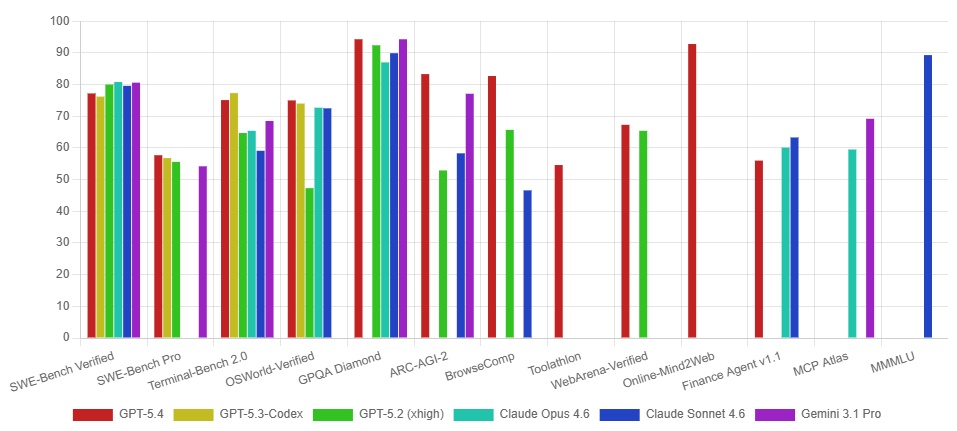
When it comes to the actual numbers, the GPT-5.4 family shows a clear order from most powerful to least, but the smaller models have some unexpected strong points. I've put together some important facts so you can see what you gain and what you give up with each model:
| Metric | GPT-5.4 (Flagship) | GPT-5.4 mini | GPT-5.4 nano |
|---|---|---|---|
| Input Cost (per 1M tokens) | ~$1.50 (estimated) | $0.75 | $0.20 |
| Output Cost (per 1M tokens) | ~$9.00 (estimated) | $4.50 | $1.25 |
| Context Window | 1M tokens | 400k tokens | N/A (smaller) |
| SWE-Bench Pro (Coding) | 57.7% | 54.4% | 52.4% |
| GPQA Diamond (Intelligence) | 93.0% | 88.0% | 82.8% |
| MRCR v2 128K–256K (Long Context) | 79.3% | 33.6% | 33.1% |
Beyond these core benchmarks, GPT-5.4 demonstrates significant improvements in reliability and professional knowledge tasks. OpenAI reports a 33% reduction in factual errors for individual claims and an 18% reduction in overall errors in full responses compared to GPT-5.2. Furthermore, on the GDPval benchmark, which assesses performance across 44 different professions, GPT-5.4 achieves an impressive 83.0%, a substantial increase from GPT-5.2's 70.9%. This indicates a marked improvement in handling complex, real-world professional workflows.
Looking at these numbers, I see a clear trend: the main GPT-5.4 is still the best for really hard thinking and remembering long conversations. But, the mini and nano versions give you a great balance of power for their price, especially for certain jobs. You'll notice the big difference in cost, which can save you a lot of money if you're using it for many tasks. The mini model does surprisingly well in coding tests, almost as good as the main model, making it a great choice for coding projects. The main model's skill at complex thinking, especially for tricky problems, makes it a very strong player, much like how Claude Opus 4.6 challenged GPT-5.2 in the AI arena with its own thinking capabilities.
Real-World Success: Specialized Workflows and Benchmarks
GPT-5.4 mini and nano aren't just smaller, cheaper models; they're special tools made to be really good at certain jobs. I've seen them shine in coding, like making specific changes, moving around in a program's code, and fixing errors, all with super fast responses (how fast the AI responds). This makes them perfect for jobs where speed and cost are the most important things (OpenAI Release Notes).
On tests, GPT-5.4 mini is much better than the older version, GPT-5 mini, in every way. For instance, it scores 54.4% on SWE-Bench Pro (compared to GPT-5 mini's 45.7%) and an impressive 72.1% on OSWorld-Verified (compared to GPT-5 mini's 42.0%) (Benchmark Data). These improvements show it's much better at coding and understanding different types of information (interpreting screenshots for computer use tasks).
One really cool way to use these models is with 'subagents.' This is where a bigger model like GPT-5.4 can plan everything and then give smaller, easier jobs to the GPT-5.4 mini helpers. This way of building systems makes things run much faster for many users and saves a lot of money. Think of it like a project manager (GPT-5.4) overseeing a team of specialists (GPT-5.4 mini) for specific tasks.
Performance Snapshot: ChatGPT Integration and Control Parameters
For everyday users, GPT-5.4 mini is already helping out in ChatGPT. You can use it if you have a Free or Go ChatGPT account, through the 'Thinking' feature in the + menu (ChatGPT Integration Update). For paid users, GPT-5.4 mini acts as a backup if the main GPT-5.4 Thinking gets too busy, so you can still get smart answers even when lots of people are using it.
But it's not just for ChatGPT. If you're a developer or an advanced user, you can tweak how the model acts using settings like reasoning.effort and verbosity. Setting reasoning.effort to 'none' can give you faster answers, perfect for quick interactions, while 'high' tells the model to think more deeply. Similarly, adjusting verbosity to 'low' can give short answers, great for quick code or summaries, whereas 'high' makes it give full explanations (GPT-5.4 Documentation). This control lets you find the right balance between how fast it answers and how good its answers are, so you can make the AI work exactly how you need it to.
Community Pulse: Inferred Limitations and Trade-offs
While the official tests make the mini and nano models look great, when I looked closer at the numbers, I found some hidden limits, especially when you compare them to the main GPT-5.4. These aren't really 'problems,' but more like smart choices that mean you gain some things and lose others, which you should think about if you're building with them.
The biggest difference shows up when the AI needs to remember a lot of information over a long time. On the OpenAI MRCR v2 8-needle 128K–256K test, GPT-5.4 achieves a strong 79.3%, while GPT-5.4 mini and nano fall far behind at 33.6% and 33.1% respectively (Benchmark Data). This means if your project needs the AI to read and understand really big documents or long chats, the main GPT-5.4 is still the one you absolutely need.
Similarly, while mini and nano are pretty smart, they don't always score as high as the bigger GPT-5.4 model on every 'smartness' test. For example, on GPQA Diamond, GPT-5.4 scores 93.0%, compared to mini's 88.0% and nano's 82.8% (Benchmark Data). This tells us that for the hardest problems that need really deep thinking, the main model still has a clear edge. These differences in performance aren't because the smaller models are bad. Instead, they show that each model is built for a specific job: the mini and nano are great for lots of quick, simpler tasks where cost matters, while the main model is for the really heavy-duty thinking.

Transforming Industries: Advanced GPT-5.4 Use Cases
GPT-5.4's unique capabilities, such as native computer use and its massive 1 million token context window, open doors to transformative applications across various industries. Here are two distinct scenarios:
Automated Financial Report Generation
Problem: Manual collection of financial data from various web portals, internal systems, and email attachments, followed by consolidation into a spreadsheet and report generation, is a time-consuming process prone to human error.
Solution: A GPT-5.4 powered agent, leveraging its native computer_use capabilities, can be tasked with this end-to-end workflow. It can navigate financial dashboards, download CSVs from emails, extract relevant figures from PDFs, input data into a master spreadsheet, and then generate a summary report and presentation slides. This is achieved through an iterative "observe-decide-act" loop, where the AI interprets screenshots and executes actions like clicks and typing.
Benefits: This significantly reduces the time and effort required for routine financial reporting, minimizes errors, and allows human analysts to focus on higher-value interpretation and strategic decision-making rather than manual data collection.
Large-Scale Legal Document Review
Problem: Reviewing vast volumes of legal contracts, case files, or regulatory documents for specific clauses, compliance issues, or critical information is an arduous and time-intensive task for legal professionals.
Solution: GPT-5.4's 1 million token context window allows it to ingest and analyze entire legal repositories or extensive individual contracts in a single pass. It can identify patterns, extract specific terms, flag discrepancies, and summarize key points across thousands of pages, providing a comprehensive overview that would take human lawyers weeks to achieve.
Benefits: This drastically accelerates the legal review process, enhances accuracy in identifying critical information, and frees up legal teams to focus on strategic advice and complex litigation, leading to more efficient and effective legal operations.
Alternative Perspectives & Further Proof: Composing Intelligent Systems
The real cleverness of the GPT-5.4 family isn't just how good each model is on its own, but how well you can put them together to build smart systems. This is where the mini and nano versions really stand out here, making it easier to build AI systems that can plan and do many steps, and do it efficiently for lots of users, by letting the smaller models handle the easier jobs, freeing up the bigger, more expensive ones.
As OpenAI keeps saying, "Instead of using one model for everything, you can build systems where the bigger models figure out the plan, and the smaller models quickly do the work for many users" (OpenAI Release Notes). This idea is already working really well. For instance, a tool called Codex uses GPT-5.4 mini helpers for easier coding jobs. This saves a lot of money, using only 30% of the usual GPT-5.4 budget for these specific functions (Codex Integration). This way, you get the most out of your resources. It lets you use the powerful, but pricier, GPT-5.4 only for the jobs that really need its full brainpower.
Practical Tip & Final Recommendation: Choosing Your GPT-5.4 Model
So, which GPT-5.4 model is right for you? It really comes down to picking the right tool for your job, based on how complex it is, how much it costs, and how fast you need it to be. Here's my simple advice:
- GPT-5.4 (Flagship): This is your main, super powerful model. Best for really hard thinking, knowing a lot about many things, and big coding projects or multi-step AI jobs. If you need one model to handle everything from building software to doing deep research, start here.
- GPT-5.4-pro: For the absolute hardest problems that need super deep thinking and might take a bit longer to figure out. Think of it as the 'expert mode' for GPT-5.4.
- GPT-5.4-mini: Your go-to for lots of coding, using computers, and AI helper jobs that need smart thinking but also need to be fast and cheap. It's the reliable helper for many real-world uses.
- GPT-5.4-nano: Ideal for easy, fast tasks where speed and low cost are the most important things. Perfect for sorting things, pulling out information, or acting as a simple AI helper.
The GPT-5.4 family offers a smart, layered way to build AI tools. By smartly using the main GPT-5.4 for hard jobs, and the mini/nano versions for lots of specific, or budget-friendly tasks, you can get the best balance of how well it works, how much it costs, and how fast it is. This isn't just about choosing a model; it's about building smart systems that are strong and useful in the real world.
Frequently Asked Questions
- How do I choose between GPT-5.4 mini, nano, and the flagship model for my project?
- Your choice depends on what your project needs: use the main model for hard thinking and big tasks, mini for lots of coding and AI helper jobs that need smart thinking and efficiency, and nano for easy, fast tasks where cost and speed are most important.
- Can the smaller GPT-5.4 models truly replace the flagship for certain tasks, or are there always compromises?
- For certain, simpler tasks like sorting things or specific coding, mini and nano can work really well and save you money. But for jobs that need deep thinking or remembering very long conversations, the main GPT-5.4 is still better.
- What are the practical implications of the new
reasoning.effortandverbosityparameters for developers? - These settings give you precise control:
reasoning.effortlets you choose between faster answers ('none') and deeper thinking ('high'), whileverbositycontrols how much detail the AI gives, from short ('low') to full explanations ('high'). This helps you make the AI act exactly how you need it to.
Sources & References
- Introducing GPT-5.4 mini and nano | OpenAI
- Using GPT-5.4 | OpenAI API
- Model Release Notes | OpenAI Help Center
- GPT-5.4 Model | OpenAI API
- Prompt guidance for GPT-5.4 | OpenAI API
- GPT-5.4 Just Dropped — And It Changes Everything About AI Agents in 2026 | by KASATA - TechVoyager | Mar, 2026 | Medium
- 😸 GPT-5.4 Review: Better Than Humans at 83% of Pro Tasks
- GPT-5.4 Review. OpenAI deployed GPT-5.4-Thinking on… | by Barnacle Goose | Mar, 2026 | Medium
- GPT 5-4 scores 20% on critpt, a benchmark of research-level physics problems
- Error 404 (Not Found)!!1
- I Tested GPT 5.4 Against Every Rival — Here's My Honest Review | Thomas Wiegold Blog
- Error 404 (Not Found)!!1

Yousef S. | Latest AI
AI Automation Specialist & Tech EditorSpecializing in enterprise AI implementation and ROI analysis. With over 5 years of experience in deploying conversational AI, Yousef provides hands-on insights into what works in the real world.




