
GPT-5.2 vs. The Giants: How OpenAI's Latest Model Reshapes the Enterprise AI Landscape
Watch the Video Summary
Here's the deal: OpenAI's GPT-5.2 promises huge advancements in how smart AI can be for work. But what does 'super advanced' actually mean for your business? And are you ready for this new way of working with AI, like telling it what to do (prompting) and connecting it to your other tools (API integration)? I've dug deep into the official announcements, technical documents, and early feedback to bring you the real story.
Quick Overview: GPT-5.2's Official Pitch and Early Impact
OpenAI recently showed off GPT-5, calling it their 'smartest, fastest, most useful model yet'. This was a big step towards putting smart AI right at the heart of every company (OpenAI Blog). Then, they introduced GPT-5.2, saying it's 'the most powerful AI yet for serious professional tasks' (OpenAI Blog). Honestly, this isn't just marketing talk; early information shows it's making a real difference.
For instance, the average person using ChatGPT for work is already saving 40–60 minutes a day. Heavy users are even saving over 10 hours a week (OpenAI Blog). Experts who need super precise scientific information have given really positive feedback on GPT-5. They've noted that 'it's more accurate, more dependable, gives better results, and works faster than older versions' (Expert Feedback, OpenAI Blog). This shows that companies are moving from just trying AI out to making it a key part of how they work.
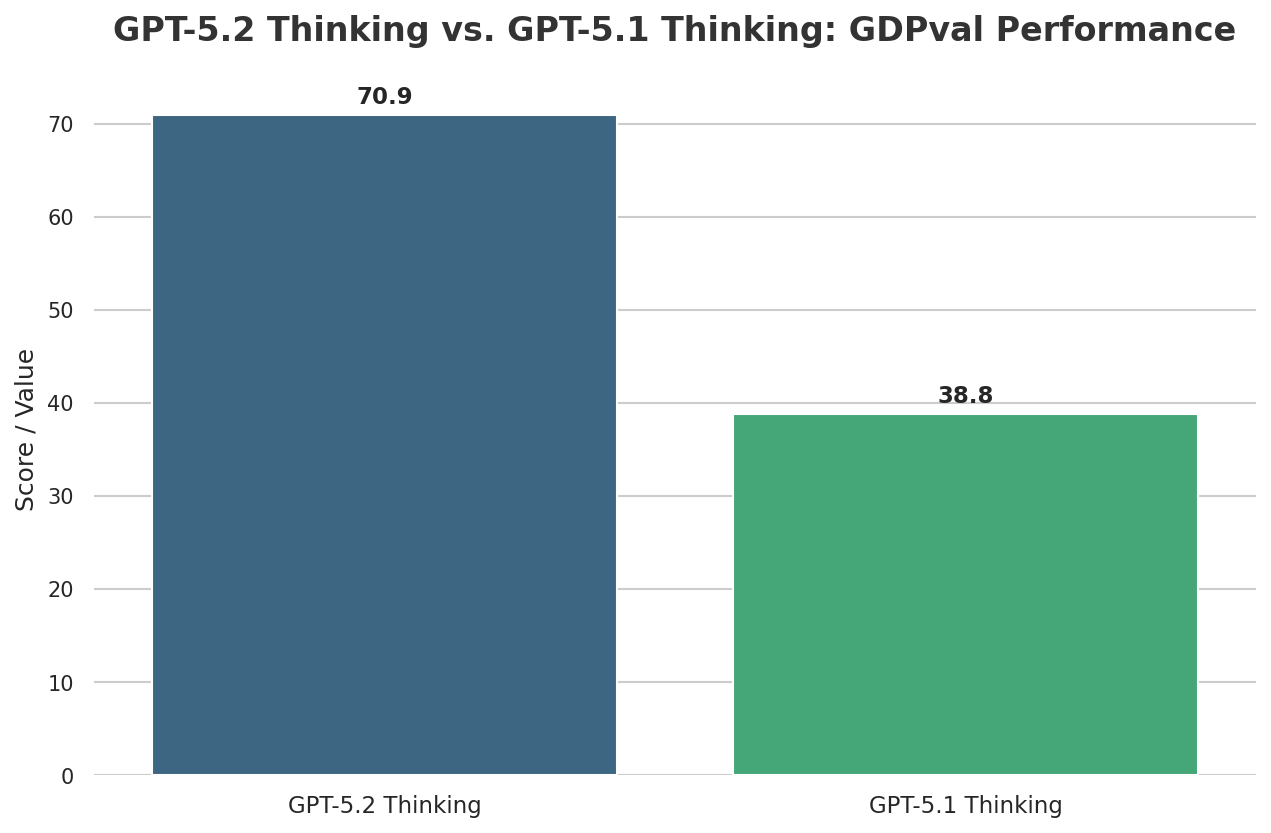
Table of Contents
- Quick Overview: GPT-5.2's Official Pitch and Early Impact
- Let's Talk Tech: The Responses API and AI That Can Act on Its Own
- Real-World Success: How It's Doing in the Real World
- Quick Look at How It Works: Understanding Different Kinds of Information and Fewer Made-Up Facts
- What People Are Saying: The Challenge of Guiding GPT-5 and New Ways to Talk to AI
- How It Stacks Up Against Others
- Practical Tip & Final Recommendation: How to Get the Most Out of It
- My Final Verdict: Should You Use It?
Let's Talk Tech: The Responses API and AI That Can Act on Its Own
Here’s the deal: one of the biggest game-changers with GPT-5 and GPT-5.2 is the new Responses API. This isn't just another connection point; it's a huge change in how it's built. It lets the AI remember what it was thinking (its internal reasoning process) over many steps and when using different tools (OpenAI Developer Guide). Think of it like giving the AI a super memory, so it doesn't forget what it was thinking in the previous step.
This capability is super important for advanced tasks where the AI acts on its own to reach a goal, and for solving tricky problems that need many steps. It really cuts down on the 'glue code' – that's the extra programming developers used to need to manage chats and tool use. This means you can launch products faster with less coding work and focus more on what your customers need (OpenAI Developer Guide).
The AI's ability to manage its own memory is a huge leap forward for building really smart AI helpers. This big step forward for AI helpers fits right in with what we've been talking about regarding the future of AI agents in Beyond the 'Sky' Controversy: Unpacking OpenAI's Strategic Voice Selection and AI Agent Future, showing a clear path for AI to become more independent.
When it comes to how well it performs, GPT-5.2 is now the best, scoring 55.6% on SWE-Bench Pro for software engineering tasks (OpenAI Blog). This test is tough, checking four programming languages and focusing on real-world problems that companies face, not just Python.
Create a single-page app in a single HTML file with the following requirements:- Name: Ocean Wave Simulation- Goal: Display realistic animated waves.- Features: Change wind speed, wave height, lighting.- The UI should be calming and realistic.Real-World Success: How It's Doing in the Real World
When we talk about 'super advanced,' what does that actually mean for your business? GPT-5.2 Thinking, made especially for professional work, is really impressive. On GDPval, a test that looks at tasks across 44 different jobs that require brainpower, GPT-5.2 Thinking is as good as or better than top experts in 70.9% of the tests (OpenAI Blog). To give you an idea, its average score for spreadsheet tasks that a junior investment banking analyst would do is 9.3% higher than GPT-5.1’s (OpenAI Blog).
This isn't just about high scores; it's about how it works in real life. Many companies are already seeing how well GPT-5.2 can think through long problems and use different tools (OpenAI Blog). For developers, it's helping them with its amazing ability to write code on its own, leading to real improvements in writing code, checking code, and finding mistakes (OpenAI Blog).
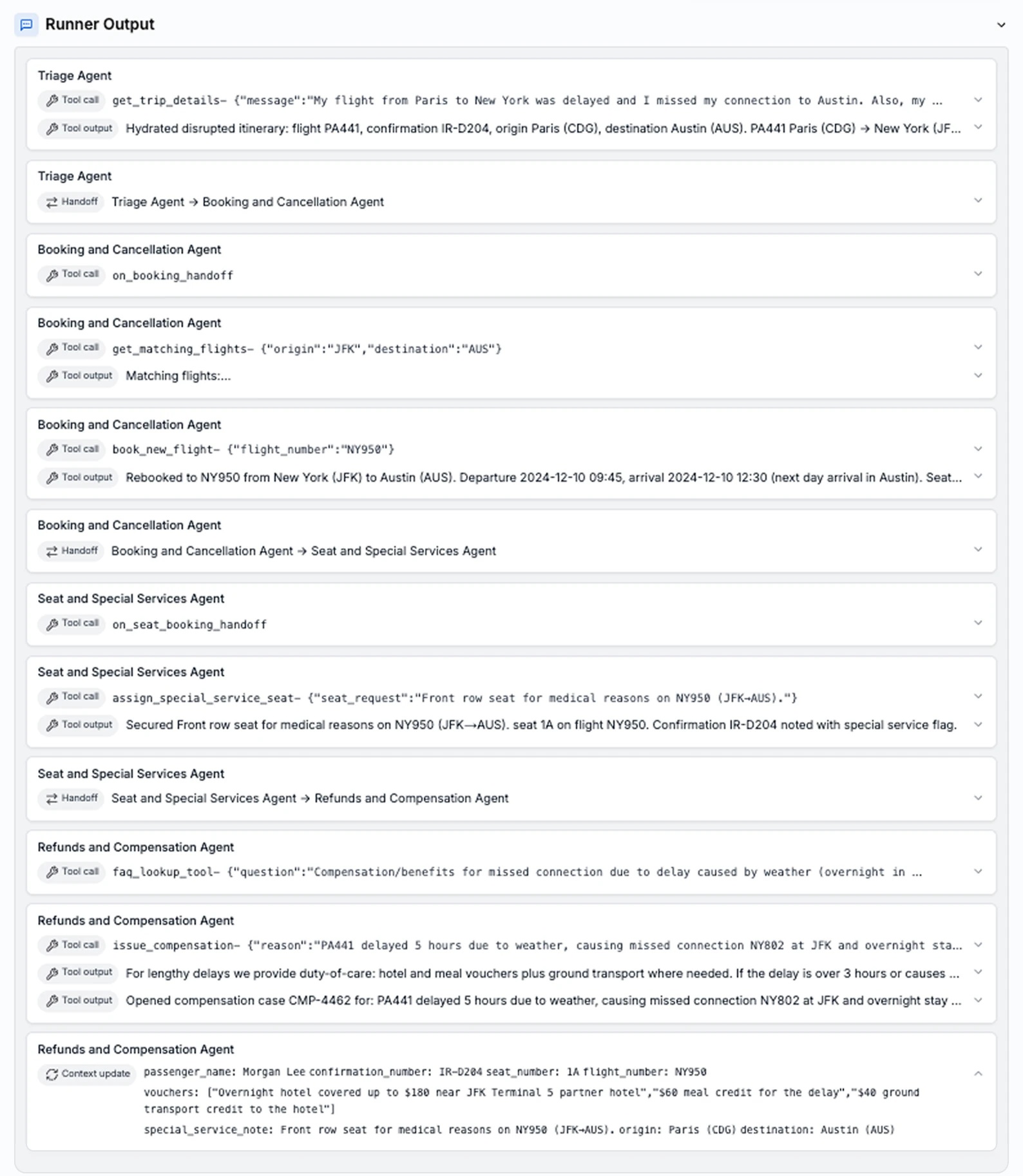
Imagine an AI that can not only understand what you ask but also manage different tools to get the job done. For example, you could give it one instruction, and it could create a complex spreadsheet, then make a presentation from it, and finally write an email to summarize everything. That's the power of its improved ability to use tools.
Quick Look at How It Works: Understanding Different Kinds of Information and Fewer Made-Up Facts
One of the most exciting improvements in GPT-5.2 Thinking is its big jump in how it handles different types of information. This means it's not just about text anymore; it can understand and think about different kinds of information, especially pictures and videos. It makes about half as many mistakes when looking at charts or understanding software screens (OpenAI Blog). So, if you're an analyst looking at dashboards or a designer reviewing product screenshots, GPT-5.2 can understand these visuals with amazing accuracy.
Also, its ability to understand long conversations and documents is a game-changer. It performs best on tests that check how well an AI can pull together information from really long documents. It even gets almost 100% accuracy on a tough test (the 4-needle MRCR variant, up to 256,000 tokens) (OpenAI Blog). This means it can keep its thoughts clear and correct even when dealing with huge amounts of text (like whole books or many project files), making it perfect for digging deep into documents and handling complicated tasks that use information from many places.
And for those of us who've struggled with AI 'making things up' (when the AI confidently creates false information), GPT-5.2 Thinking offers a big improvement: it makes up facts 30% less often than GPT-5.1 Thinking (OpenAI Blog). This means fewer mistakes when you're doing research, writing, or analyzing things, making it a more reliable helper for your professional tasks. This reduction in factual errors is a huge step forward. It builds on the constant improvements we've seen in models like those discussed in GPT-5.4 Unveiled: OpenAI's Latest Breakthroughs and the Nuances of Its Immediate Impact, showing that OpenAI is really focused on making AI trustworthy.
What People Are Saying: The Challenge of Guiding GPT-5 and New Ways to Talk to AI
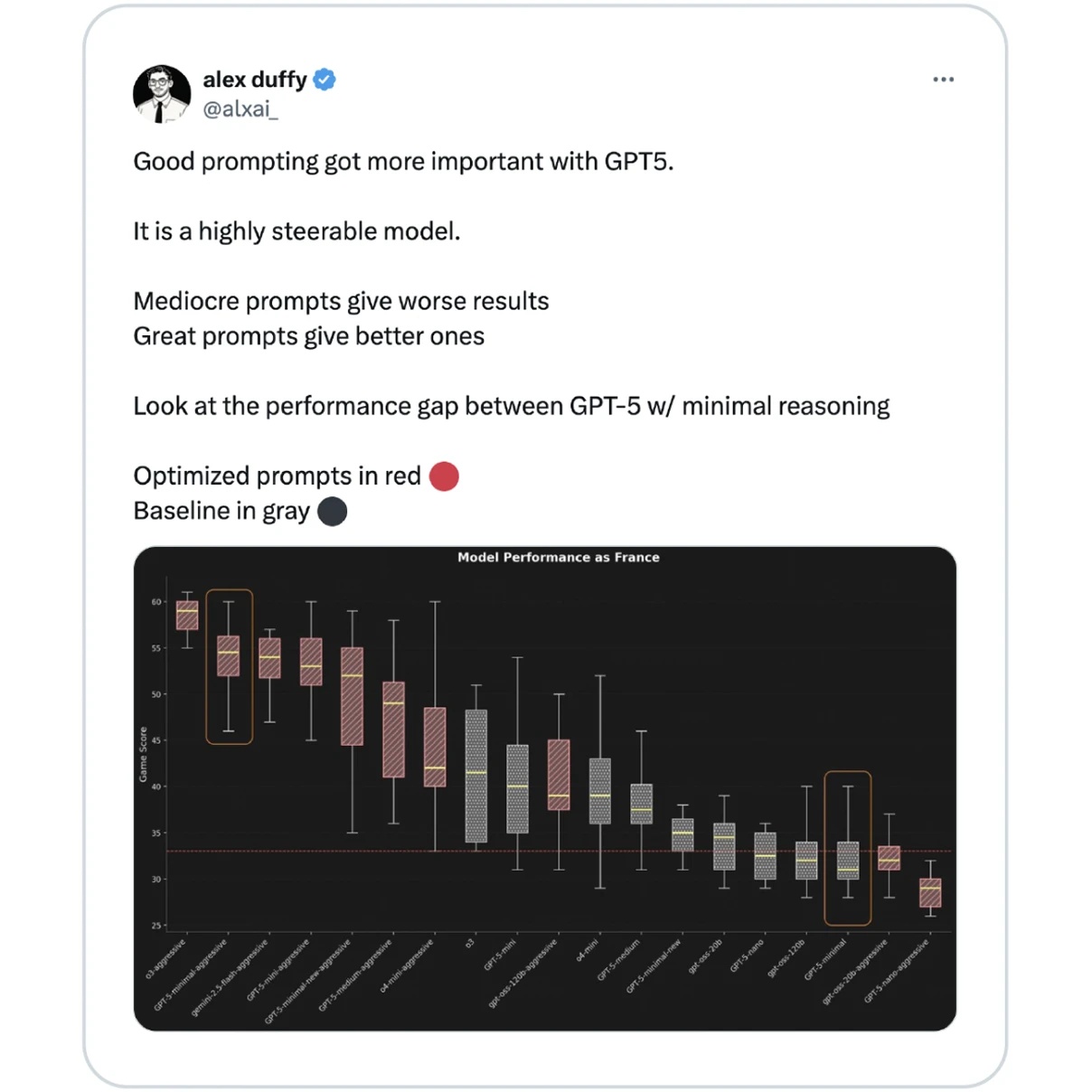
I dug into what the experts are saying, and here's the catch with GPT-5: it's 'highly steerable,' which is fantastic! But it also means you need a more careful way of giving it instructions (OpenAI Developer Guide). The instructions you used that worked perfectly with older models like GPT-4.1 just won't work the same way. This isn't a bug; it's actually a feature, but it does mean you'll need to learn some new tricks.
Experts say that 'okay prompts' can now give 'worse results' than before, while 'great prompts' will help you get the very best performance. It's like upgrading from a basic camera to a professional DSLR – the potential is huge, but you need to learn the new controls. New features like reasoning_effort and verbosity let you tweak how the AI acts, guiding how it thinks and talks to fit how complex your task is (OpenAI Developer Guide). This level of control is powerful, but it requires you to really learn how to use it.
(Note: Reddit Community Intel was not provided for this analysis, so insights are drawn from official documentation and expert observations.)
How It Stacks Up Against Others
In the super competitive world of AI, GPT-5.2 isn't just trying to catch up; it's creating new benchmarks. My analysis shows it always does better than other models, even its older version GPT-4o-2024-11-20, especially in important areas like understanding medical information from different sources (like text and images) (OpenAI Blog). This puts it clearly ahead of what competitors like Google and Anthropic offer in many professional tests.
Here's a quick snapshot of how GPT-5.2 Thinking stacks up against its predecessors and the general competitive field:
| Metric | GPT-5.2 Thinking | GPT-5.1 Thinking | GPT-5 (General) |
|---|---|---|---|
| GDPval (wins or ties) | 70.9% | 38.8% | N/A |
| SWE-Bench Pro (public) | 55.6% | 50.8% | N/A |
| Hallucination Reduction (relative) | 30% less | Baseline | N/A |
| Junior Investment Banking Analyst Tasks (Avg Score) | 68.4% | 59.1% | N/A |
OpenAI's bigger goal is still to create artificial general intelligence (AGI) – super smart AI that can do anything a human can – to help everyone (OpenAI Research). GPT-5.2 is a big step on that journey, pushing what AI can do in complicated, real-world work situations.
Practical Tip & Final Recommendation: How to Get the Most Out of It
So, how do you actually use this new power? My practical advice for anyone looking to start using or make the most of GPT-5.2 is simple:
- Switch to the Responses API: This is a must-do if you want long-term growth, speed, and to really unlock all of the AI's thinking power. It's built for remembering its thoughts and using tools more smartly, which means less extra coding work for you (OpenAI Developer Guide).
- Learn Good Prompting Practices: Forget your old instructions. Start experimenting with metaprompting (that's like giving the AI instructions on how to think) and create a collection of instructions specifically for GPT-5.2's unique way of working. If you master this, you'll move faster and create much better products (OpenAI Developer Guide).
- Play Around with the New Controls: Check out settings like
reasoning_effortandverbosity. These let you tweak how the AI acts to perfectly match how complex your task is and what kind of output you want.
The future of AI-powered professional work isn't just about having the smartest AI; it's about knowing how to use it well. GPT-5.2 requires a new way of thinking and planning, but the rewards in terms of being faster, more accurate, and more creative are huge.

My Final Verdict: Should You Use It?
GPT-5.2 represents a huge jump forward for AI that's ready for serious work, offering amazing abilities in thinking, writing code, and understanding different kinds of information. It's not just a small update; it's a whole new way of doing things. While it requires you to change how you plan and use its new API and advanced ways of giving instructions to get the most out of it, the benefits for business leaders, AI experts, and tech entrepreneurs are obvious. If you're serious about bringing the latest AI into your work for complicated, important tasks, GPT-5.2 is a powerful tool that can change what you thought was possible, even if it asks a lot from you. For those still using older models, consider GPT-5.2 as the must-have upgrade to make sure your AI plans are ready for the future.
Frequently Asked Questions
How does GPT-5.2's 'highly steerable' nature impact my existing prompts?
Because GPT-5.2 is so much easier to guide, your old, less specific instructions might not give you the best results. You'll need to improve how you give instructions, maybe by using metaprompting (telling the AI how to think) and new controls like `reasoning_effort` and `verbosity`, to get its full potential.
Is the Responses API a mandatory upgrade for all GPT-5.2 users?
While you don't have to for simple tasks, switching to the Responses API is highly recommended for any company or developer who wants to use GPT-5.2's advanced abilities, like AI that acts on its own, remembering its thoughts, and less extra coding for complex projects.
Since it's so focused on big companies, is GPT-5.2 suitable for small businesses or individual developers?
Absolutely. While GPT-5.2 is amazing for big companies, its better accuracy, fewer made-up facts, and advanced thinking abilities offer big benefits for small businesses and individual developers. This is especially true if you want to build smarter and more dependable AI apps, particularly for complex tasks that need many steps or deep knowledge.
Sources & References
- GPT-5 and the new era of work | OpenAI
- Introducing GPT-5.2 | OpenAI
- Research | OpenAI
- A practical guide to building with GPT-5 | OpenAI
- [2508.08224] Capabilities of GPT-5 on Multimodal Medical Reasoning
- [2511.16072] Early science acceleration experiments with GPT-5
- Just a moment...
- OpenAI unveils GPT‑5. Here's what to know about the latest version of the AI-powered chatbot. - CBS News
- OpenAI COO Brad Lightcap: GPT-5's Capabilities, Why It Matters, and Where AI Goes Next - YouTube
- GPT-5 accelerates scientific research with new proofs and case studies | ETIH EdTech News — EdTech Innovation Hub
- GPT-5 Users Say It Seriously Sucks
- Guess what else GPT-5 is bad at? Security | CyberScoop
- Anthropic vs. OpenAI: The Two AI Giants Compared | DataCamp

Yousef S. | Latest AI
AI Automation Specialist & Tech EditorSpecializing in enterprise AI implementation and ROI analysis. With over 5 years of experience in deploying conversational AI, Yousef provides hands-on insights into what works in the real world.




