

Google Search's Audio Overviews: Hands-Free Search, But With Limits
Watch the Video Summary
Imagine getting a quick, friendly summary of your search results without lifting a finger – Google's new Audio Overviews promise just that. According to Google's official announcement on June 13, 2025, this new Search Labs experiment uses their latest Gemini models to generate quick, conversational audio overviews for certain search queries. But here's the deal: like many of Google's 'Labs' experiments, the reality comes with some familiar warnings and questions about how useful it is right now.
Table of Contents
- Google Search's Audio Overviews: How Google Wants You to Get Info Without Lifting a Finger
- How It Works: Gemini and Why It's Still a Test
- Google's Bigger Plan for Audio AI: What We've Learned So Far
- How You Use It: Turning It On, Listening, and Giving Feedback
- The Catch: It's Still a Test, So Expect Mistakes, Delays, and Less Control
- Other Cool Tools: What Else Is Out There for Audio Summaries
- My Take: Is Google's Audio Overview Ready for You?
Google Search's Audio Overviews: How Google Wants You to Get Info Without Lifting a Finger
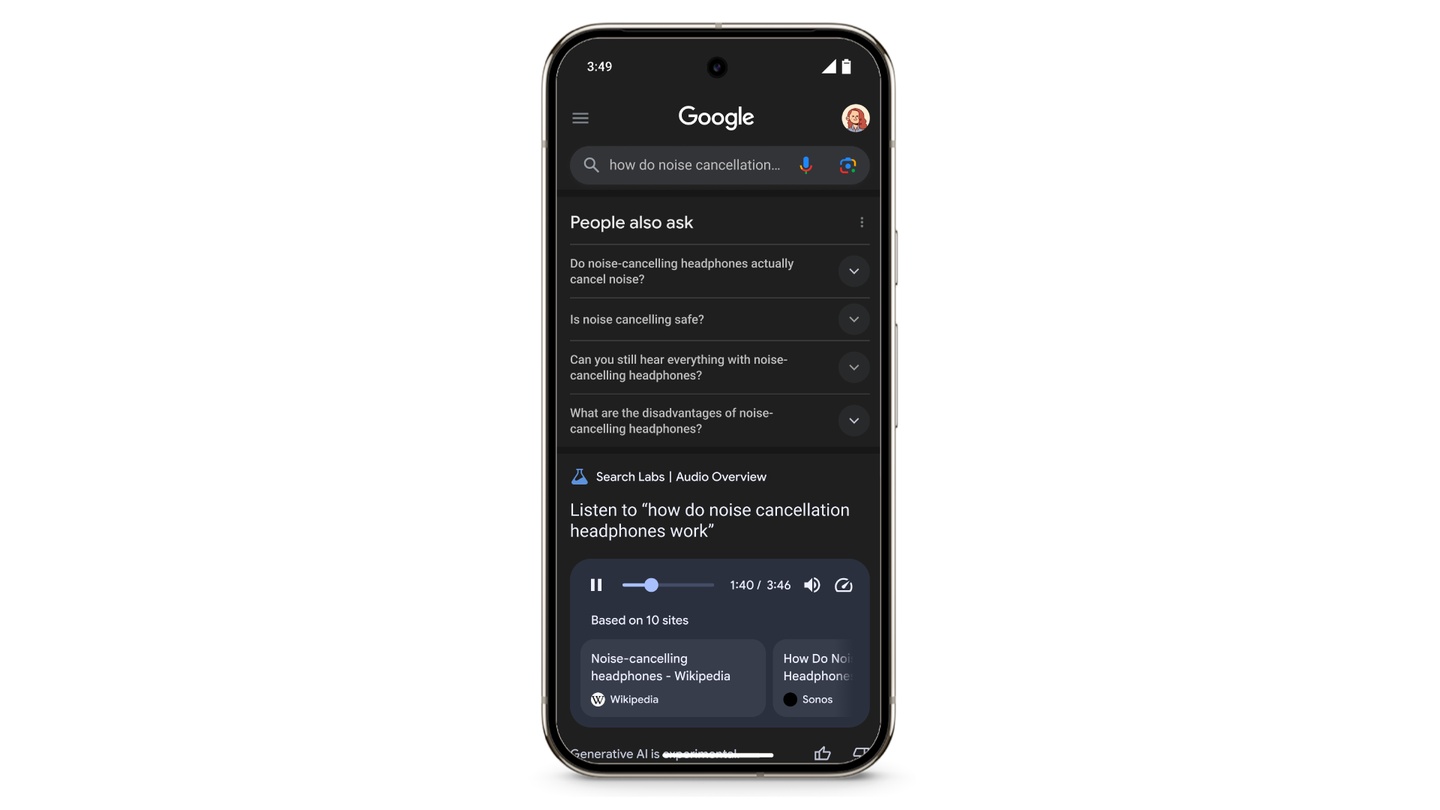
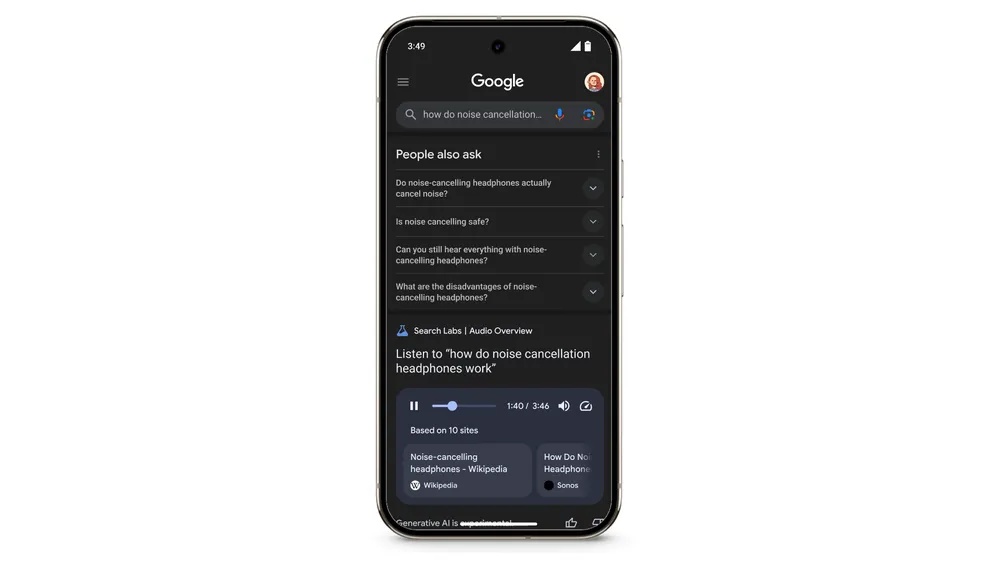
Google is always trying new ways for us to get information. Their newest idea, called Audio Overviews in Search Labs, is a great example. This new test aims to give you information without you having to touch anything, which is super handy when you're learning about something totally new. I've looked into it, and this feature uses Google's newest Gemini AI to create quick, friendly audio summaries of what you find on Google Search (Google Search Labs).
The main idea is simple: it's an easy way to quickly understand a topic without using your hands. The cool part? While you're listening, you'll still see useful web pages right there in the audio player on your search results. This means you can easily click to learn more if something sounds interesting. But wait, there's a catch: remember, this is still very much a 'test' – it's just a sneak peek at what Google might do in the future.
How It Works: Gemini and Why It's Still a Test
So, how does this cool trick happen? Google says that Audio Overviews use their newest Gemini AI to create these friendly summaries from the best search results (Google Search Labs). This means the smart computer program is doing all the hard work, taking information and turning it into something you can listen to.
But wait, there's a catch! Like with any brand-new AI, there are some things to keep in mind. Right now, this feature only works in English and only in the US (Google Search Labs). And here's a big point: it can take up to 40 seconds to create the audio. That's a pretty long wait when you're used to instant search results! Google is honest about this being an experiment, warning that AI that creates things is still in testing, so you might find mistakes and sound issues (Google Search Labs). Think of it like a beta test – it's exciting to try, but it won't be perfect yet.
To give you a peek at the technical side, even if it's just a placeholder for something that might not always work, here's an example of what a computer interaction might look like:
404. That’s an error.
The requested URL /grounding-api-redirect/AUZIYQHD53JT2tRhBDi1w8zPlPwIUyeV8rdzAJNNFWenT5nYuTc-lUhJU6fOSnS_Q8J2onekkhj9SuxW4TASxI0v6esUQMwv6a7VhCvDIOMHfOe3Wylgrc1pwF_lH2DlwEh-_L_3DZ1e4Ti7UAw7XVTsz6mMCQv5WXqzmbu7VpRM28AkkehojKU9Pf-0Tj3s70QOLzHlg==
was not found on this server. That’s all we know.
/grounding-api-redirect/AUZIYQHD53JT2tRhBDi1w8zPlPwIUyeV8rdzAJNNFWenT5nYuTc-lUhJU6fOSnS_Qf8J2onehkhj9SuxW4TASxI0v6esUQMwv6a7VhCvDIOMHfOe3Wylgrc1pwF_lH2DlwEh-_L_3DZ1e4Ti7UAw7XVTsz6mMCQv5WXqzmbu7VpRM28AkkehojKU9Pf-0Tj3s70QOLzHlg==Google's Bigger Plan for Audio AI: What We've Learned So Far
This isn't Google's first time playing with AI-powered audio. The Audio Overviews in Search Labs are part of a bigger, ongoing plan. We've already seen some really cool uses in other Google products:
- NotebookLM's Audio Overview: This feature lets you listen to a chat about your own study materials. With just one click, two AI voices start a lively, in-depth discussion based on the stuff you've uploaded. They summarize, connect ideas, and even chat a bit, and you can download the whole conversation (Google Blog). This has been super helpful for understanding complicated documents while you're doing other things.
- AI-powered audio summaries for PDFs in Google Drive: This feature, launched in late 2025, lets you instantly turn long PDFs into friendly, podcast-style audio summaries (Google Workspace Updates). This is a huge step forward for getting things done faster and making information easier to access. It helps you quickly grab the main points, review things before meetings, and gives you another way to take in content.
These successes show how useful and promising AI-driven audio can be. They set the stage for what Search Labs' Audio Overviews might eventually become.
How You Use It: Turning It On, Listening, and Giving Feedback
Starting with Audio Overviews is super easy. First, you just need to sign up for the test in Labs. Once you've turned it on, if Google thinks an audio summary would be helpful for what you searched, you'll see a button on the search results page. You can then tap it to create a short audio overview (Google Search Labs).
The audio then plays right there on the results page, so you don't have to go anywhere else. Google also really cares about what you think! They've made it easy to give feedback: You can give a thumbs up or down on each summary, and also on the whole experiment in Labs (Google Search Labs). This feedback is super important for Google to make the feature better and better.
The Catch: It's Still a Test, So Expect Mistakes, Delays, and Less Control
While the idea is really exciting, the truth about Audio Overviews – and other test AI features – is that they come with some familiar limits. Google clearly says that AI that creates things is still in testing, so you might find mistakes and sound issues (Google Search Labs). Making these things perfect is a big focus for developers, as you can see with special tools for AI Audio Enhancement from Adobe, NVIDIA, Descript, and Auphonic. This means you shouldn't count on it for super important information just yet.
Beyond Google's official warnings, people who have reviewed similar features, like NotebookLM's audio, point out common problems that probably apply here too:
- How long it takes: Search Labs says it takes up to 40 seconds, but similar audio summaries can take several minutes to create, and sometimes they don't work at all (Search Engine Land). This can really slow you down.
- No personal touch: You can't tell the AI to focus on specific topics or questions (Search Engine Land). The AI decides what's important, and that might not be what you need.
- Robot-like Sound: Even though it's getting better, the audio quality can still sound a bit fake, not quite like a real person talking. Making AI voices sound truly natural is a big goal for companies like ElevenLabs, whose progress we talked about in ElevenLabs' $11B Valuation: A Leap Towards the Future of AI Audio.
- Limited Sources: The summary only uses what Google's AI finds from the top search results. You don't get to choose where the information comes from.
These limits are a clear reminder that we're still at the very beginning of truly smart audio summaries. The '404 error' you see below is like a visual way of saying 'not available' or 'errors' that you might run into with these test features, showing that things aren't totally stable yet:
404. That’s an error.
The requested URL /grounding-api-redirect/AUZIYQGVn8luwxieDrhw5wR7ew1vhwx-wYenax_WUCffnM6IzL0gRJHLVKzWGs82D42PqEB1B7DXsZn0It-_Sm-0G3zo3rCSQae5QIwu4_XVnaL9TzY480JbB3FkEmGxw0p6zNqj_qHfPWQx72fFe3q1nb3u0OMWLlsnVdaxu6KTYS1OHKD-NmJV1g77aZy1U4HguDcfVU9wHTnHsC46PZcCyKOkyHrFOqZYz7rQYYxvMLELu7fmEtR_3nD6uZpiWJ9SpgAX8681iG-w39cFx90=
was not found on this server. That’s all we know.
/grounding-api-redirect/AUZIYQGVn8luwxieDrhw5wR7ew1vhwx-wYenax_WUCffnM6IzL0gRJHLVKzWGs82D42PqEB1B7DXsZn0It-_Sm-0G3zo3rCSQae5QIwu4_XVnaL9TzY80JbB3FkEmGxw0p6zNqj_qHfPWQx72fFe3q1nb3u0OMWLlsnVdaxu6KTYS1OHKD-NmJV1g77aZy1U4HguDcfVU9wHTnHsC46PZcCyKOkyHrFOqZYz7rQYYxvMLELu7fmEtR_3nD6uZpiWJ9SpgAX8681iG-w39cFx90=| Feature | Google Search Audio Summaries | NotebookLM Audio Summaries | Drive PDF Audio Summaries | Illuminate (for Research Papers) | Podwise | Snack Prompt |
|---|---|---|---|---|---|---|
| Purpose | Quick audio summaries of search results | AI chats about your own documents | Turns PDFs into podcast-like summaries | Helps you understand research papers | Takes notes from podcasts/audio | Fast summaries of web pages |
| AI Model | Google's newest Gemini AI | AI hosts (uses Gemini) | Uses AI | AI creates discussions | Uses AI | Uses AI |
| Availability | US, English (Labs) | General availability | General availability | General availability | General availability | General availability |
| Generation Time | Up to 40 seconds (can be longer) | Instant (pre-generated) | Instant | Instant | Varies by content length | Quick |
| Customization | None | Limited (based on sources) | None | Limited | High (structured notes, export) | Limited |
| Audio Quality | Sounds a bit robotic (still a test) | Sounds natural, like a conversation | Sounds natural, like a conversation | Sounds like a conversation | Depends (original audio + AI notes) | Sounds a bit robotic |
| Source Control | Only uses top search results | You upload your own sources | You upload your own PDFs | Works with specific research papers | You provide the audio/podcasts | Web pages (you can't choose sources) |
Beyond Google: A Landscape of AI Audio Summary Tools
Google isn't the only one making AI audio summaries. There's a whole world of tools out there, each with its own strengths and ways of doing things:
- Illuminate (Google DeepMind): This is best for understanding academic papers with AI-created discussions. It's specifically designed to make research papers easier to get through using audio that sounds like a conversation (Search Engine Land).
- Podwise: This is best for turning podcast episodes and other audio into organized notes. It's perfect for people who create content or do research and listen to a lot of spoken audio.
- Snack Prompt: This is best for getting quick audio summaries of web pages and articles. If you need a fast overview of a blog post or news story, this tool aims to give it to you.
- ElevenLabs (Text-to-Speech Platform): This is best for making custom audio from your own written summaries. It doesn't summarize for you, but it provides incredibly natural-sounding voices for whatever you've already written.
These other options show that while Google's tool covers a lot, specialized tools often offer more in-depth features for specific needs.
My Take: Is Google's Audio Overview Ready for You?
Honestly, Google's Audio Overviews in Search Labs give us an exciting peek into a future where you can get information without touching anything, all thanks to Gemini AI. It's a neat feature for just browsing around, especially when you want a quick introduction to a new topic without staring at your screen. But wait, there's a catch: because it's still a test, it has some limits. You might run into mistakes, delays, and you can't really customize it. This means it's not quite ready for when you need really important information. If you're doing serious research or need very specific summaries, you'll probably be better off with more developed tools like NotebookLM (for your own documents) or Illuminate (for academic papers). My advice? Go ahead and try it out in Labs to see what's coming, but don't expect it to be perfect for everything you need right now.

Frequently Asked Questions
How accurate are Google's Audio Summaries right now?
Since this is a test feature, Google clearly says that Audio Overviews might have mistakes and sound problems. It's best for just looking around and learning new things, not for gathering really important information.
Can I make the audio summary focus on certain parts of my search?
Right now, Google's Audio Overviews don't let you choose what to focus on. The AI decides what to summarize from the top search results, without you telling it what specific topics or questions you care about.
Is Google's Audio Overview good for serious research or just for quick browsing?
Because it's still a test, might have delays, and you can't customize it, Audio Overviews are better for quick browsing and getting a fast introduction to new topics. For serious research, you're better off using more proven tools or checking the sources yourself.
Where I Got My Info
- Google Search Labs: Audio Summaries
- Google Blog: NotebookLM - Listen to Your Sources
- Google Workspace Updates: AI Audio Summaries for PDFs in Drive
- Search Engine Land: Google Search Audio Summaries - A Promising Test with Limits
- Google DeepMind: Illuminate (Research Papers)
- ElevenLabs Website
- New Audio Summaries Test in Search Labs
- Error 404 (Not Found)
- Audio Summary - Search Labs
- NotebookLM: Listen to Conversations About Your Sources
- Google Workspace Updates: New AI Audio Summaries for PDFs in Google Drive
- Research on Audio Summaries
- Research Paper Listener: AI Audio Summaries
- Google AI Overview Alternatives
- Error 404 (Not Found)
- Google Tests Audio Summaries for Search Results
- NotebookLM Audio Alternatives: 6 Options

Yousef S. | Latest AI
AI Automation Specialist & Tech EditorSpecializing in enterprise AI implementation and ROI analysis. With over 5 years of experience in deploying conversational AI, Yousef provides hands-on insights into what works in the real world.




