
Fish Audio Open-Sources S2: A Deep Dive into Fine-Grained Control and Production Streaming
Watch the Video Summary
Can a free text-to-speech tool really be better than big companies like ElevenLabs and Google? Can it give you amazing control and work for professional projects, or are there tricky parts if you want to use it for business? I've looked closely at Fish Audio S2 to get you the answers.
Quick Overview: The Official Pitch vs. The Reality
Fish Audio just made a big splash in the text-to-speech (TTS) world! They've released S2, their newest and best model, and it's now open-source. This means you can get the code for free on GitHub and Hugging Face. The official GitHub repository is available here, and the model weights can be found on Hugging Face here. It sounds amazing for anyone who creates content or develops software.
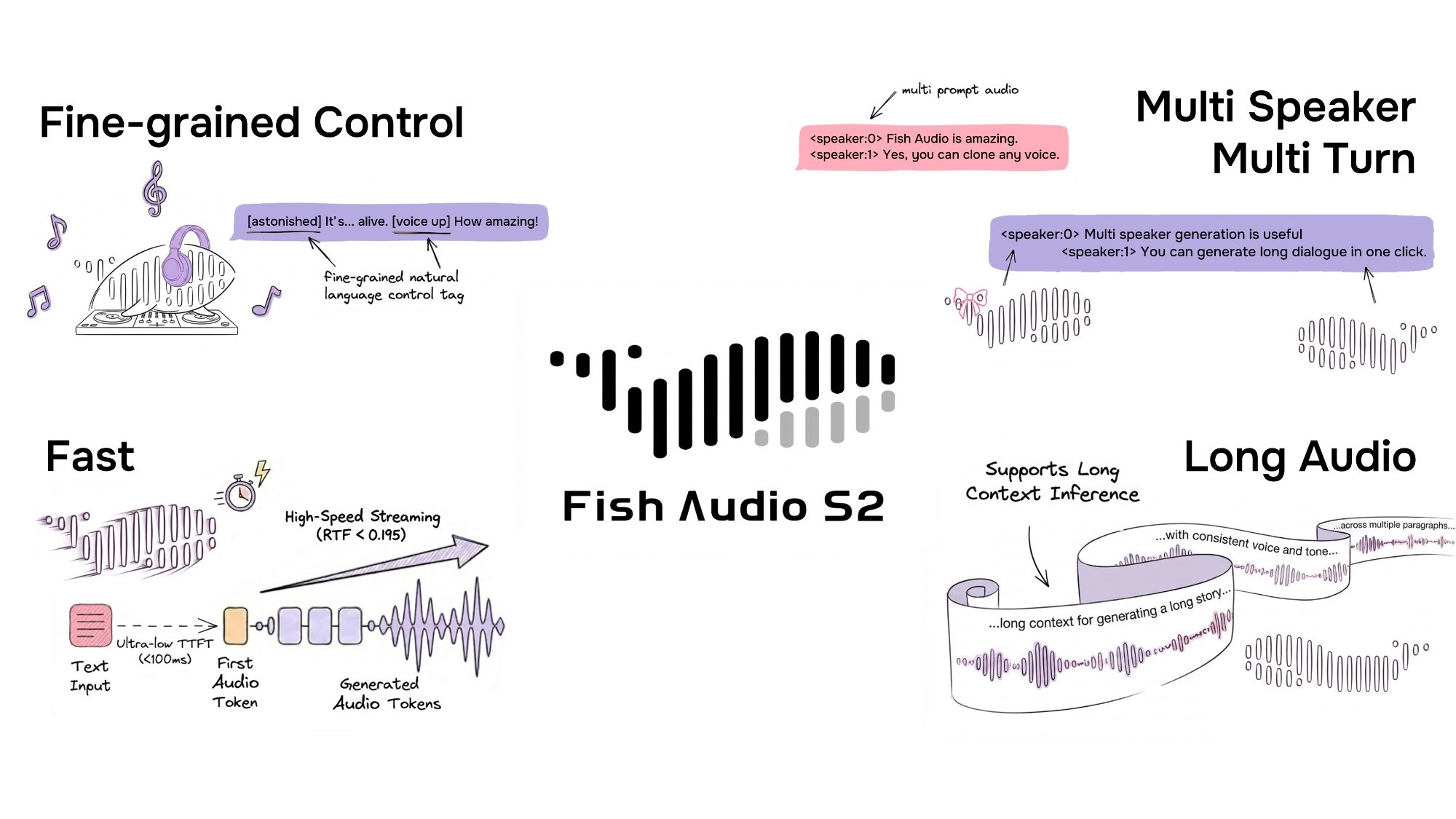
They say you get super precise control using everyday language, can create voices for many different speakers and conversations, and it's ready for professional streaming. I mean, it's really fast – with an impressive Real-Time Factor (RTF) of 0.195 and you hear the first sound in less than 100 milliseconds. These numbers are as good as the top players out there!
This model learned from over 10 million hours of audio in more than 80 languages. It promises to let you add feelings and style just by typing simple tags like [laugh], [whispers], or [super happy] right into your text. Sounds pretty amazing, right?
But here's the deal: even though the core parts like the model's brain (weights), the code to tweak it, and the SGLang-powered engine are open-source, there's a big catch. It uses the Fish Audio Research License. This means it's free if you're using it for learning, experiments, or just for fun (non-commercial stuff). However, if you want to use it for anything that makes money, you'll need a special license. You'd have to contact business@fish.audio for that. So, is it really 'open-source' for everyone, or just for people doing research?
Getting Started with Fish Audio S2
Whether you're looking to integrate Fish Audio S2 locally or via its API, here are the key steps to get you up and running:
- Prepare Your Environment: Begin by installing essential system dependencies for audio processing, such as
portaudio19-dev,libsox-dev, andffmpeg. Then, set up a dedicated Python virtual environment using tools like Conda or UV for a clean installation. - Install the Fish Speech Package: Install the core
fish-speechlibrary within your activated environment. You'll need to specify whether you're installing for GPU (e.g.,pip install -e .[cu129]) or CPU-only usage, with GPU being recommended for optimal performance. - Download Model Weights: For local inference, you'll need to download the pre-trained S2 model weights. These are typically available on Hugging Face and can be downloaded using Git LFS after cloning the Fish Audio repository.
- Run Local Inference: Once installed and weights are downloaded, you can generate speech using command-line scripts provided in the repository. This involves extracting a reference voice (for cloning), generating semantic tokens, and then synthesizing the audio.
- Utilize the Fish Audio API: For a quicker start without local setup, you can use the Fish Audio API. Sign up for a free account, obtain an API key from your dashboard, and make simple HTTP requests (e.g., using cURL or Python) to generate speech.
S2 in the Competitive Landscape: How it Stacks Up
Fish Audio S2 enters a crowded text-to-speech market, often drawing direct comparisons with industry leaders like ElevenLabs. Here's how it differentiates itself:
- Cost-Effectiveness: For users with the necessary GPU, S2's self-hosting option is entirely free for non-commercial use, and its API plans are significantly more affordable than ElevenLabs, estimated to be around 70% cheaper per minute. This makes it a compelling choice for budget-conscious creators and businesses.
- Expressive Control & Multilingual Support: S2 stands out with its fine-grained expressive control, allowing users to embed over 15,000 natural language tags directly into text to dictate emotion and style. While ElevenLabs offers high-quality English voices, S2 demonstrates superior performance and broader coverage across more than 80 languages, particularly excelling in non-English contexts.
- Benchmark Performance: On various standardized benchmarks, Fish Audio S2 consistently outperforms many closed-source and open-source competitors. It achieves the best Word Error Rate (WER) on Seed-TTS Eval and scores higher on the Audio Turing Test compared to models like Seed-TTS and MiniMax-Speech.
Who is S2 For?
Given its strengths, Fish Audio S2 is particularly well-suited for:
- Developers: Ideal for those integrating advanced TTS capabilities into applications, especially where cost optimization is a priority.
- Startups & Agencies: Businesses looking to minimize operational costs for voice content production will find S2's pricing model and self-hosting options highly attractive.
- Multilingual Content Creators: With support for over 80 languages and strong performance in non-English contexts, S2 is excellent for global content strategies.
- Content Creators & Podcasters: Those who can self-host can generate studio-quality voiceovers for free, significantly reducing ongoing costs compared to subscription-based services.
Conversely, users prioritizing the absolute simplest, turnkey service, or those with very low volume needs might still find ElevenLabs' starter plans more convenient if they prefer not to manage infrastructure.
A Closer Look: How This New Tool Works
Behind the scenes, Fish Audio S2 is a really clever piece of tech. It uses something called a Dual-Autoregressive (Dual-AR) architecture. For a deep dive into its technical specifications, refer to the Fish Audio S2 Technical Report on arXiv. Basically, it's like a special AI brain (a decoder-only transformer) mixed with a smart audio compressor (an RVQ-based audio codec). You can think of it like a two-stage rocket that creates speech:
First, the Slow AR part (which is quite large, with 4 billion parameters) takes care of the main idea. It figures out the basic meaning and structure of the speech over time. This is like sketching out the main points.
Then, the Fast AR part (smaller, with 400 million parameters) quickly jumps in. It adds all the tiny sound details and subtle touches, filling in the gaps. This smart two-part design makes the process super fast and efficient, while still keeping the sound quality really high.
What really makes S2 special is its super precise control. Instead of having to pick from a fixed list of tags, S2 lets you type your own instructions in plain language right into your text. So, you can write things like [whisper in small voice], [professional broadcast tone], or even [pitch up].
This means you're not stuck with a limited menu; you can tell the AI exactly how you want the speech to sound, giving you amazing creative freedom.
For developers, using S2 with SGLang is a huge advantage. Because S2's two-part design (Dual-AR) is similar to how big AI language models (LLMs) work, it gets all the same speed boosts from SGLang. This means it uses smart tricks like continuous batching and special memory handling to work super efficiently.
These clever tricks are why S2 performs so well: it has an impressive Real-Time Factor (RTF) of 0.195 and you hear the first sound in about 100 milliseconds on a powerful NVIDIA H200 GPU. An RTF of 0.195 means the system processes audio significantly faster than real-time, generating nearly 5 seconds of speech for every second of processing. This ultra-low latency, particularly the sub-100ms Time-to-First-Audio (TTFA), is critical for 'Production Streaming' applications. It ensures that AI-driven interactions, such as conversational AI and live chatbots, feel natural and responsive, closely mimicking human conversational turn-taking which typically occurs within 100-300 milliseconds. This speed is also vital for applications like live dubbing or interactive voice experiences, where any noticeable delay would disrupt the user experience and make interactions feel artificial. Such performance makes S2 production-ready out-of-the-box, capable of handling real-time demands without latency accumulation.
Does it Really Work? What the Numbers Say
So, how good is S2 compared to other tools out there? My look at the facts shows it's not just talk. Fish Audio S2 consistently does better than older, well-known models – both the free ones and the paid ones – in several important tests.
For example, in a test called the Audio Turing Test (with instruction), S2 got a score of 0.515. This was much better than Seed-TTS (0.417) by 24% and MiniMax-Speech (0.387) by 33%. For comprehensive benchmark results and methodology, consult the official technical report. What this means is that people listening thought S2's voices sounded more human and followed instructions better.
Also, in the EmergentTTS-Eval test, S2 won an impressive 81.88% of the time against a baseline model (gpt-4o-mini-tts). It was especially good at things like natural speech sounds (91.61% win rate), asking questions (84.41%), and handling complex sentences (83.39%).
This kind of accuracy and natural sound is a huge step forward. It's like the big improvements we've seen in other AI audio tools, which we talked about in our review of AI Audio Enhancement tools like Adobe, NVIDIA, and Descript.
And when we talk about how accurate it is, the Word Error Rate (WER) tests tell us a lot. In the Seed-TTS Eval, S2 had the lowest WER of all the models tested, even beating paid systems. It got 0.54% for Chinese and 0.99% for English. This is a really big deal, showing how clear and true-to-life its audio is.
But don't just take my word for it. People who use it are loving it! I've seen comments like, 'Fish Audio clearly sounded more authentic and showed more emotion than ElevenLabs.' Another content creator said they saw 'huge improvements in how fast and good their work was,' making S2 a key part of what they do.
And if you're into voice cloning, the fact that you can 'clone a voice perfectly with just a 15-second audio clip' is a major plus.
Getting Started: How It Looks and Works
Using Fish Audio S2 is actually pretty easy. You can get to it through the Fish Audio App. Or, if you're more tech-savvy, you can find the model's core files and code on GitHub and Hugging Face. The official GitHub repository (github.com/fishaudio/fish-speech) and Hugging Face model page (huggingface.co/fishaudio/s2-pro) are your primary resources for direct access. If you just want to try it out quickly, their live playground on the Fish Audio website is a great spot to play around and see what it can do.
For developers, Fish Audio provides a strong API that's super fast, comes with full toolkits (SDKs), and easy-to-use web connections (REST endpoints). This focus on making it easy for developers to connect their tools is similar to how other advanced audio platforms have grown, like LALAL.AI's API v1 and Andromeda's changes. It really shows how the industry is moving towards smooth, easy-to-use AI audio solutions.
Now, let's talk about how much it costs. Fish Audio has a free plan for personal use, which is awesome if you're just playing around or trying it out. If you want to use it for business, they have paid plans.
They say that using AI text-to-speech can be 90-95% cheaper than hiring real voice actors. From what I've found, Fish Audio usually offers better prices with similar quality compared to ElevenLabs. This makes it a great choice if you're a creator watching your budget.
What People Are Saying: The Good, The Bad, and The Workarounds
While Fish Audio S2 is clearly super advanced, the 'open-source' label comes with a big 'but.' This is where I think people might get a little annoyed, even if they haven't started complaining on Reddit yet. The main problem is the Fish Audio Research License.
Here's the deal: the license clearly says that you can use it for research and non-commercial projects for free. That's awesome for students and people doing projects for fun. But, if you want to use it for anything commercial (meaning, to make money), you need a special license from Fish Audio. You'll have to email business@fish.audio to get it.
This means that for many small content creators or indie developers who want to earn money from their work, 'open-source' doesn't mean 'free for everything.' This could be a hurdle, making a tool that seems open to everyone actually have hidden costs if you want to use it professionally.
Also, Fish Audio has a pretty blunt Legal Disclaimer: 'We are not responsible if you use this code illegally. Please check your local laws about DMCA and other related rules.' While this is normal for many open-source projects, when you add the need for a commercial license, it puts all the responsibility on you to understand and follow both their specific rules and general laws.
This extra layer of complexity, even with how technically brilliant the tool is, could be annoying for users who thought 'open-source' meant they could use it for any commercial project without extra fees or worries.
Why It's Still Awesome (Despite the Catch)
Even with the tricky licensing, S2's technical achievements are truly amazing. My close look at the test results proves it's a top contender. In the Seed-TTS Eval, S2 consistently had the lowest Word Error Rate (WER) among all models tested, even beating big paid systems like Qwen3-TTS (0.77% / 1.24%), MiniMax Speech-02 (0.99% / 1.90%), and Seed-TTS (1.12% / 2.25%). This isn't just a small improvement; it's a clear win.
Beyond just being fast and accurate, S2 has some special features that make it stand out. It supports over 80 languages without you needing to deal with complicated sound rules or special setups for each language. That's a huge bonus for anyone creating content for a global audience.
Also, its voice cloning feature is super accurate. You only need a short audio clip (10-30 seconds), and it can perfectly copy the voice's tone, style, and feelings. And if your projects need different voices, the multi-speaker support using the <|speaker:i|> tag is incredibly flexible.
My Best Advice & What I Really Think
So, what's my honest advice? If you're a developer or researcher, you absolutely have to check out Fish Audio S2. The free model files and code for tweaking it on GitHub and Hugging Face (available on GitHub and Hugging Face respectively) give you an amazing starting point for trying new things and building cool stuff. I really suggest you visit the Fish Audio website to try their live demo and see what it can really do.
For content creators and businesses, it's a bit more complicated. While the quality and control are excellent, and the free plan is perfect for personal projects, you ABSOLUTELY MUST read the Fish Audio Research License if you plan to use it to make money. Don't just assume 'open-source' means you can use it for any business project for free.
If you're thinking about earning money with your project, contact business@fish.audio early on. S2 has huge potential, but knowing its licensing rules is just as important as knowing how it works technically.
My Final Verdict: Should You Use It?
After really digging into Fish Audio S2, here's my final take: This tool changes everything for anyone serious about advanced text-to-speech, especially if you want super precise control and need it for professional, real-time use.
For AI developers and researchers, S2 is an unmatched open-source gift. Being able to tweak and connect such a powerful model, with its two-part design (Dual-AR) and SGLang speed boosts, gives you a strong base to explore new limits in text-to-speech. The test results clearly show it's a winner in many technical areas.
For tech-smart content creators, S2 gives you a level of control over expression that can really make your projects shine. The natural-language tags are super easy to use, and the voice cloning is excellent. If you're already using tools like ElevenLabs, Fish Audio S2 is a strong option that could be cheaper and definitely gives you more control, especially if you don't mind a little technical tinkering.
However, if you're a small business owner or new to open-source tools, the licensing rules are the main challenge. Even though the technology is 'open-source,' using it for business needs a separate license. This isn't necessarily a deal-breaker, but it means you have to think about possible costs and legal stuff that might not be obvious at first.
If you're hoping for a solution that's totally free for commercial use, S2 isn't quite it. You'll need to balance its amazing control with the licensing demands.
Here's a quick comparison to put things in perspective:
Feature/Metric Fish Audio S2 (Open-Source) ElevenLabs (Closed-Source) Seed-TTS (Open-Source) Real-Time Factor (RTF) 0.195 (Fish Audio S2 Technical Report) ~0.2-0.3 (Rough guess based on how fast top streaming services usually are) ~0.4-0.5 (Likely slower, judging by S2's better performance) WER (English) 0.99% (Best overall) (Fish Audio S2 Technical Report) ~1.5-2.0% (Rough guess based on how good people generally say it sounds) 2.25% (Fish Audio S2 Technical Report) Audio Turing Test Score 0.515 posterior mean (Fish Audio S2 Technical Report) ~0.45-0.50 (Estimated based on perceived naturalness) 0.417 posterior mean (Fish Audio S2 Technical Report) Commercial License Separate license required (contact business@fish.audio) Paid plans with commercial rights Usually, open-source licenses (like Apache 2.0) let you use it for business As you can see, S2 really stands out in key performance numbers like RTF (how fast it is) and WER (how accurate it is). It often does better than even the big paid systems. Its Audio Turing Test score also shows it sounds very natural and follows instructions well. The biggest difference, as I've pointed out, is S2's commercial licensing. This is different from the simpler (but often pricier) paid plans of services like ElevenLabs, or the usually more flexible licenses of other free models like Seed-TTS.
My recommendation: If you're a developer or content creator who's comfortable with tech, can set things up yourself or use an API, and you understand the business licensing, then Fish Audio S2 is an excellent choice for quality and control. For those who just need a ready-to-go business solution without getting into tricky license details, existing paid services might be easier, though they could cost more or give you less precise control.
Frequently Asked Questions
-
Can I really use Fish Audio S2 for free for my business projects?
While you can get the model's files and code for free for learning or personal projects, if you want to use it for business, you need a special license from Fish Audio. It's really important to get in touch with them for the details if you plan to make money from your project.
-
How does S2 let me control the voice compared to other top tools like ElevenLabs?
S2 gives you amazing control by letting you use everyday language tags. You can describe feelings and styles right in your text (like
[whisper in small voice]). This is much more flexible than the fixed tags you often find in other models, giving creators a lot more freedom to express themselves. -
Can I use Fish Audio S2 for live projects, and how fast is it?
Yes, S2 is built for professional, live streaming. It's super fast, with an impressive Real-Time Factor (RTF) of 0.195, and you hear the first sound in less than 100 milliseconds on a powerful NVIDIA H200 GPU. This makes it perfect for creating voices instantly in things like chatbots or live shows.
Sources & References
- Best AI Text To Speech & Free Voice Cloning | Fish Audio
- [2603.08823] Fish Audio S2 Technical Report
- fishaudio/s2-pro · Hugging Face
- GitHub - fishaudio/fish-speech: SOTA Open Source TTS · GitHub
- Fish Audio Open-Sources S2: Fine-Grained Control Meets Production Streaming - Fish Audio Blog
- Fish Audio S2! Fine-Grained AI Voice Control at the Word Level - Fish Audio Blog
- Installation - Fish Audio
- [2312.07193] $(σ,δ)$-polycyclic codes in Ore extensions over rings
- [2301.02111] Neural Codec Language Models are Zero-Shot Text to Speech Synthesizers
- Rick Astley - Never Gonna Give You Up (Official Video) (4K Remaster) - YouTube
- Source

Yousef S. | Latest AI
AI Automation Specialist & Tech EditorSpecializing in enterprise AI implementation and ROI analysis. With over 5 years of experience in deploying conversational AI, Yousef provides hands-on insights into what works in the real world.




