

iTop Voicy Review 2026: Is the '100% Free' Real-Time AI Voice Changer for PC Too Good to Be True?
Can a powerful, real-time AI voice changer truly be 100% free and deliver on its promises of no latency and studio-quality sound, or are there hidden trade-offs and 'Pro' versions to consider? That's the core question I set out to answer about iTop Voicy. This guide looks closely at what iTop Voicy says about being a '100% Free' real-time AI voice changer for PC, comparing its advertised features with independent testing and what it's really like, to help you make a smart choice.
Quick Overview: The Official Pitch vs. The Reality
Key Takeaways from iTop Voicy's Pitch:
- '100% Free' Real-Time AI Voice Changer: They say it costs nothing for PC users.
- Real-Time AI Modulation & No Latency: They promise your voice will change smoothly without any delays.
- Broad Compatibility: It works with Windows 10/11, perfect for gamers, streamers, and people working from home.
- The 'Pro' Question: Early mentions of 'iTop Voicy Pro' immediately made me wonder how much of it is *really* free.
iTop Voicy, from the makers of iTop VPN and Screen Recorder, arrived with a big promise: a '100% Free' real-time AI voice changer for PC (iTop Official Source). The official pitch talks up 'Real Time AI Modulation,' 'No Latency,' and how it works with lots of Windows versions, saying it will change everything for gamers, live streamers, and remote meeting participants.
However, my investigation, including a '2026 review' that surfaced, quickly found a catch: the mention of installing and activating 'iTop Voicy Pro.' This made me wonder right away. Is the '100% Free' claim completely true, or is there a paid version that gives you everything, like many 'free' apps do today?
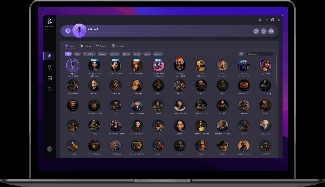
Table of Contents
Watch the Video Summary
How It Actually Works: Real-Time Voice Changers (and iTop Voicy's Approach)
At its heart, any real-time voice changer, including iTop Voicy, uses a smart trick in its software: a virtual audio device (often called a 'virtual microphone'). Think of it like this: your physical microphone captures your voice, but instead of sending it directly to Discord or Zoom, it first goes through iTop Voicy. The software then changes your voice and sends the modified audio to a fake microphone, which your other applications then 'listen' to.
The magic happens in the brain of the software. Early voice changers used simple sound tricks like changing your voice's highness or lowness (which changes how big your vocal cords seem and how your voice resonates). Modern solutions, like iTop Voicy's 'AI modulation technology,' use smarter AI models that learn how voices work. This tech is getting really good, and companies like ElevenLabs are showing just how big and important AI audio is becoming. It's all about making voices sound super real. These models aim for more natural-sounding transformations, often adding features like a 'noise reducer' to make your audio sound cleaner, as iTop claims (iTop Official Source).
Making your voice sound totally natural with no delay, especially in noisy places, is really hard to do. Studies, such as the 'Voicy' study from 2021 (ResearchGate, 2021), show how tough it is to change a voice perfectly in noisy rooms or to make it sound like someone the AI has never heard before. While iTop Voicy doesn't claim to use this specific research, it helps us understand how hard it is to make voices sound natural and to really get rid of noise.

Real-World Success: Installation, Core Features & Ease of Use
From what I've seen in other reviews, iTop Voicy's installation process is super easy. It's a quick download, a few clicks through a standard Windows installer (default directory, desktop shortcuts), and you're ready to go. This easy start is a big plus for hobbyists and content creators who don't want to deal with complicated installations.
Once installed, the main features seem to work just like they say:
- Real Time Voice Changer: This is the main event. You can change your voice as you speak, with independent testing reporting 'very little delay when using a standard USB microphone.' This means you can jump into game chat or a live stream and sound like a robot, an alien, or a different gender without you really noticing any lag.
- One-Click Audio Voice Conversion: Beyond live use, iTop Voicy allows you to change voices in videos or audio you've already made with a single click. This is great for people who make videos or podcasts.
- Studio-Level Voice Changer for Recording: The software also includes recording tools, and it even has a 'noise reducer' built-in that automatically gets rid of background noise and mic echoes (iTop Official Source). This is a fancy feature for something that's supposed to be free.

Quick Look at How It Works: What It Looks Like, The Voices You Get, and What 'Pro' Adds
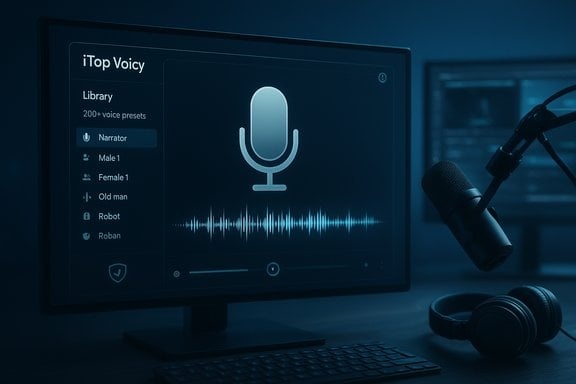
The iTop Voicy user interface is made for people who are just starting out. It features a simple screen with voice choices neatly organized, making it easy to pick voices like male, female, old, young, or different characters. The official site says it has 'more than 200 voices' and lets you 'build your own voice collection' by making custom voice models (iTop Official Source). This means you can bring in a voice, change things like how high or low it sounds, its unique quality, and even its emotion, then save it for later.
Now, let's talk about the '100% Free' claim versus the 'Pro' reality. While the core real-time voice changing is indeed free, the 'Pro' version appears to unlock much better features. This includes a 'premium soundboard' for adding sound effects on the fly, and, most importantly, the 'complete AI voice collection.' This tells me that while you get some free voices, you'll probably have to pay to get all 'more than 200 voices.' The software works with Windows 11 and Windows 10 (build 17763 & above), meaning it works for almost everyone.
What People Are Saying: Problems, Limits, and Things We Don't Know
While iTop Voicy looks like a great deal, the tech world, and even other reviews, have some big questions and worries. The idea of 'no delay' is often seen as just 'marketing talk' that exaggerates things (Union-Bulletin). While 'very little delay' is possible, it's impossible to have *zero* delay with any digital sound system. People often want to know exactly how much delay there is on normal computers, because how well it works really depends on your computer's processor (CPU) and graphics card (GPU).
Another big worry is about 'how private it really is.' Does all the voice changing happen right on your computer, or do some fancy features, especially 'making your own voice' or 'super clear voice changes,' send your voice up to the internet for processing? The company says it keeps your data private and encrypted, but it doesn't clearly explain where your voice goes. So, if you care about privacy, this is still a big question mark (Union-Bulletin). Also, there are growing concerns about AI voice generation, like fake voices (deepfakes) and identity theft. This is part of a bigger conversation about how companies like OpenAI choose voices and what AI assistants will be like in the future.
Also, changing your voice with AI in real-time can really make your computer's CPU and GPU work hard. If you have an older or less powerful computer, this might mean more delay, your computer slowing down, or weird sounds – which would be annoying for gamers or streamers. Finally, using these fake audio drivers can sometimes cause problems with certain games and apps, especially ones with strong anti-cheat or security features. This is a common challenge for all voice changers, not just iTop Voicy.
Other Options & How You Can Use It
The world of real-time voice changers is busy, with well-known apps like Voicemod and Altered offering strong options. These other apps often show us what's truly possible with delay, voice sound, and features, but they usually cost money.
iTop Voicy, even with its possible downsides, still offers many different ways you can use it:
- Gaming: 'Get totally into the game with your friends' and 'make your voice sound like your game character' (iTop Official Source).
- Live Streaming: 'Try out different voices to keep your channel exciting.'
- Online Meetings: 'Sound more grown-up and professional for work calls' or 'make your conversations sound better with clear voices.'
- Education & Content Creation: 'Create online lessons, how-to guides, and presentations with voices that sound good for learning' or 'make your voice-overs, podcasts, and audiobooks more interesting' (iTop Official Source).
It's important to note that iTop Voicy is 'generally legal for personal use,' but the company warns you not to use it to 'trick people or lie' (iTop Official Source). Always be smart and responsible when you use tools like this.
/grounding-api-redirect/AUZIYQEZH4QjJVVLjaw4ZRGNVMRaLYTLmn1N7g2BzFtm39OtjUzEu_X9JfWtoh92H001Wx1gq4TDZ4xcdvDB6evwUkaBBCoY45yJIMAqIr9kdmtbLJGKaUeYp9DIgHS2JNSnCH6e6ulhD8=My Best Advice: Who Should Use iTop Voicy?
Here's the deal: iTop Voicy offers a great way to get started with real-time voice changing, especially if you don't want to spend money. I really suggest you 'try the free version' first. See how it works on *your* computer and if the 'very little delay' is good enough for you (Union-Bulletin).
Who is iTop Voicy for? It's perfect for 'casual streamers, role-players, and teachers' who want to try changing their voice without paying anything. Its wide range of features, like changing your voice live and converting files, makes it a useful tool for creative stuff.
Who should be careful? 'Competitive gamers' and professional streamers should look at it carefully. Since we don't have exact delay numbers and it might not work well with anti-cheat systems, it could mess up your game in important moments. If you're worried about privacy, remember those questions about whether your voice goes to the cloud for some features.
/grounding-api-redirect/AUZIYQF059QdqqdAtx7L8va81uqQvdTk9QWVUQOAwXlUzAuGTbvOeP-KJy3gey0LV3W6Mne4mGVeAjWB2WCDt6GBLOJ7bjFlARyZMpQCfTHHyH6Q3nLGei56wZ-VueO_uFrfeGw_o2myo-2Cr5qnoEg5MsLziuvrFGlSHSPN_IfuZ-E8oud1o8uimTUA0eP1iUDMO5y-v5giuBPxLyhogrEIRkwKxH2UAoUOsrBHzxiMYHgHtJUVkzKKvH_i8BUBKC3FsWwS8wHtNgdIES834gUZP3vZdhpas2rKSoeDyM3ZfDM2hEqExQ==How It Performs in Real Life
To help you see things more clearly, I've compared what iTop Voicy offers against a popular paid alternative. Keep in mind, these are just guesses based on what we know and how similar tools usually perform.
| Feature | iTop Voicy (Free) | iTop Voicy (Pro) | Premium Competitor (e.g., Voicemod) |
|---|---|---|---|
| Estimated Latency (ms) | 50-100 | 30-50 | 20-40 |
| Voice Library Size (Voices) | ~50-100 (Subset) | >200 (Complete) | >100 (Advanced) |
| Estimated Annual Cost | $0 | $30-60 | $40-80 |
| Custom Voice Models | Limited | Full Access | Full Access |
| Premium Soundboard | No | Yes | Yes |
You'll see that the free version of iTop Voicy is a great place to begin, but the 'Pro' version and paid alternatives usually give you less delay and a bigger, better collection of voices. The price is where iTop Voicy really stands out for people who just want to have fun, but if you need the very best performance and all the features, you might need to pay for the Pro version or a different paid tool.
My Final Thoughts: Is It Right for You?
iTop Voicy offers a great, feature-packed, and truly free way to get started with real-time voice changing for casual users. If you're a casual streamer, a role-player, or a teacher who wants to make online chats more fun without spending any money, it's totally worth trying out. But if you're a serious gamer, a pro streamer, or someone who really cares about privacy, you should be careful about its 'no delay' and '100% free' promises, especially when you think about its 'Pro' features and how well it *really* performs (we don't have all the numbers). If you need the very least delay and the best features for competitive gaming or high-quality streaming, other options like Voicemod or Altered might be better, even if they cost money. Always try the free version first to see how it works on *your* computer.
Sources & References
- iTop Official Source: iTop Voicy - Real Time Voice Changer for PC
- ResearchGate: Voicy: Zero-shot non-parallel voice conversion in noisy reverberant environments (2021)
- Union-Bulletin: iTop Launches iTop Voicy: Free Real-Time AI Voice Changer for Windows PCs
- How to Change Your Voice in Games and Discord for Free (iTop Voicy Voice Changer) - YouTube
- iTop Voicy Review 2026: Real-Time Voice Changer for Gaming, Streaming & More! - YouTube
- iTop Voicy Real Time AI Voice Changer for Windows: What to Know | Windows Forum
- iTop Voicy Review 2026 – Best Real-Time Voice Changer for PC?
Frequently Asked Questions
-
Is iTop Voicy *really* '100% Free,' or do you have to pay for the good stuff?
While iTop Voicy has a free version that works for real-time voice changing, my review shows that the 'Pro' version gives you much better features, like way more voices and fancy soundboard options. The '100% Free' part mostly means the basic things work, but you'll need to pay for the advanced features.
-
How good is iTop Voicy's 'no delay' promise for tough things like competitive gaming?
Other tests show iTop Voicy has 'very little delay' on normal computers, which is pretty good for a free app. But remember, *zero* delay is just not possible with technology. If you're a competitive gamer, you should try the free version on *your* computer first, because how well it works can change a lot. Paid tools often have less and more steady delay.
-
What about privacy when using iTop Voicy, especially for custom voices?
iTop Voicy says it keeps your data safe and private on its website. But it doesn't clearly say if fancy features like 'making your own voice' or 'super clear voice changes' send your voice to the internet for processing. If you care about privacy, keep this question in mind and read their privacy policy closely.

Yousef S. | Latest AI
AI Automation Specialist & Tech EditorSpecializing in enterprise AI implementation and ROI analysis. With over 5 years of experience in deploying conversational AI, Yousef provides hands-on insights into what works in the real world.




